

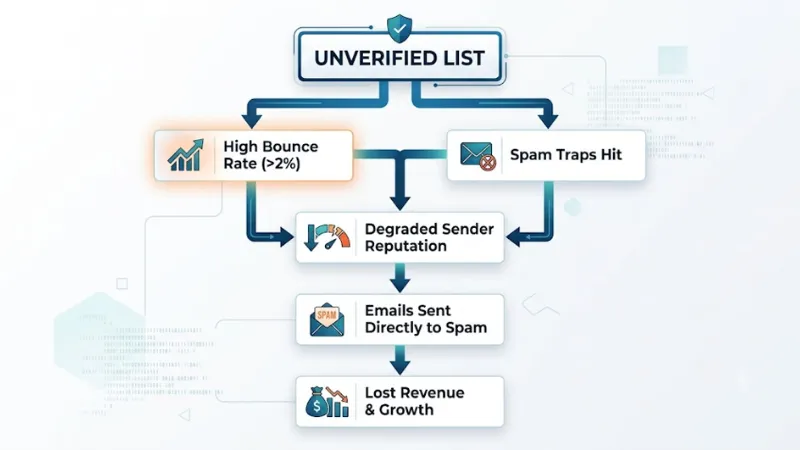
In today's world of digital marketing and cold sales, good data helps you make more money. You can spend a lot of time writing emails that people want to read. You can make websites and build lists of who you want to reach. But if your email does not show up in their main inbox, all that work is wasted.
 Follow us
 Follow us
Email lists can lose people as time goes by. The number of people in the list can go down by about 22% to 30% each year. People may change jobs, or get new internet plans. Some may stop looking at old inboxes. A few may use a fake address or type their email wrong when they sign up.
The email verification check is important to keep your system safe. It finds out if an email address is real without sending any mail. This keeps your domain safe. It also cuts work for your platform and helps you get more from your efforts.
1. How Email Works: The Multi-Step Pipeline
Email checking does more than check for the @ sign in text. Now, platforms look at each email or big list with strong checks to find problems.
RECOMMENDED FOR YOU



Strategic Entry: Scaling an Entertainment Startup in the Australian Market
Team SR
May 4, 2026
[ Email Input ] ──► Syntax & Formatting Check ──► Domain & DNS/MX Resolution ──► SMTP Handshake Ping ──► Risk Classification (Spam Traps/Catch-All/Disposable)
Step 1: Syntax & Format Validation
The engine analyses the structure of the email to find out whether it meets the standards set by the Internet Engineering Task Force. It will alert you about any problem in the construction of your email address. This might be due to the fact that it lacks an identifier after the "@" sign. It might also be because it contains two "@" signs, incorrect characters or trailing spaces.
Step 2: Domain and MX Record Lookup
The system does a live DNS test to see if the domain name is working. It also looks for Mail Exchanger (MX) records. If there are no MX records, the mail servers for that name can't get messages. Any email sent to it will bounce back every time.
Step 3: Direct SMTP Protocol Handshake
This is the main way to check email. The engine begins to speak to the other person’s mail server using SMTP (Simple Mail Text Protocol). It pretends to send a message and reaches the RCPT TO: command. The server tells if the mailbox is real or not. The engine stops before sending any real email.
Step 4: Advanced Risk Analysis & Flagging
The system does more than only check if an account is there. It uses tools to look at the address in lists that people know about. This helps find places that might harm you.
- Disposable/Temporary Emails: These are emails you make for a short time on some sites. They stop working after some minutes.
- Spam Traps & Honeypots: These are old emails that groups and ISPs keep. They use them to check who is sending lots of unwanted emails.
- Role-Based Accounts: These are emails like info@, sales@, or support@. A team uses them, not just one person.
- Catch-All Domains: These mail servers get all emails sent to that name. You cannot know who gets each email unless you see it goes to them.
2. Why Email Verification Is Crucial for Your Business
If you send emails to unverified lists, your costs can go up. This can put your whole digital communication system at risk.
Protecting Sender Reputation & Deliverability
Internet Service Providers check your email and IP address by looking at some numbers about your email health. When your bounce rate from an email goes over 2%, their computers will mark you as someone who might send spam or have bad info. If your score goes down, even if you send good emails to real people, they will end up in the Spam folder.
Eliminating Wasted Marketing Spend
Most email platforms and marketing tools increase pricing when you get more subscribers or send out more emails. When you pay to keep and send to email addresses that are not real, the cost of your database goes up because you are paying for people that are not there.
Maintaining Accurate Analytics
Bounces, dead accounts, and bot traps can change your click rates and open rates. When you clean your list, you make a good starting point. This helps make sure your marketing numbers show what real people do and how they connect with you.
3. Core Features of Modern Email Verification Tools
Modern validation solutions give you tools that help with fast manual checks. They also work well for bigger workflows.
- Bulk List Cleaner: Upload your CSV or TXT files with many contacts. The tool checks all addresses at the same time. It sorts contacts into groups like Deliverable, Undeliverable, Risky, or Catch-All. This makes it easy for you to filter them.
- Real-Time Email Checking API: Add this tool to your website’s sign-up forms, store checkouts, or CRM apps. It catches bad addresses, entries made by bots, and typing errors before they go into your database.
- Checkup & DNS Tools: Use extra tools like MX Record Lookups, SPF/DMARC Policy Checkers, Email Extractors, and ESP Finders. These show you how a site is set up and pull contacts from text that is not in order.
4. Best Practices for Email List Hygiene
Using an email verifier is one way to help with good email deliverability. If you want your emails to reach inboxes all year, you should:
- Check Before Every Big Campaign: You need to look over your list before you send cold emails or newsletters. Do this in a group way, more so if your info has not been used in over 30 days.
- Use Double Opt-In: Ask new people to click a link sent to their email. This lets you know the email is theirs and that they want to get your stuff.
- Get Authentication Protocols: Make sure your domain has working SPF, DKIM, and DMARC records. This helps mail servers know who you are.
- Remove Subscribers: Who Don't Take Action:Take out contacts who do not open or click emails over six months.email verification makes your emails get to people who want them.
Summary Matrix: List Verification Statuses
| Verification Result | Technical Meaning | Recommended Action |
| Deliverable (Valid) | Domain, MX, and mailbox exist and responded positively to SMTP ping. | Safe to Send. High probability of primary inbox landing. |
| Undeliverable (Invalid) | Domain missing, invalid format, or mailbox does not exist. | Delete Immediately. Sending will cause a hard bounce. |
| Risky / Role Account | Functional address (admin@, info@) or disposable burner mailbox. | Segment / Suppress. Exclude from main outreach to avoid complaints. |
| Accept-All (Catch-All) | Server accepts all incoming mail regardless of local part validity. | Proceed with Caution. Test in small batches to monitor bounce rates. |
Recommended Stories for You


Team SR Jul 28, 2026

Team SR Nov 14, 2025

Team SR Aug 21, 2026

Team SR Jul 2, 2026

Team SR Feb 18, 2026
Trending Stories

What Free Really Means When You Register an LLC: State Fees, Service Fees, and First-Year Tools

From First Apartment to Graduation: What Students Need From a Boston Property Manager

A Startup Founder’s Guide to Choosing the Right Digital Growth Channels

Technical Applications for Modernizing Oil and Gas

How to Choose a Nonprofit Board Seat That Fits Your Life, Not Just Your Calendar

The Business Behind The Job: What Customers Never See In A Construction Company

Winning New Customers: How FinTech Startups Can Stand Out In A Competitive Market
From Spreadsheet to WhatsApp: Smarter Follow-Up for Growing Teams