

Best AI Video Generator for Musician in 2026: Runway vs Pika vs Kaiber vs Freebeat Comparison
Jul 10, 2026 | By Team SR
 Follow us
 Follow us
AI video is no longer just a creator novelty. For musicians, startup marketers, and lean creator-tech teams, it is becoming part of the launch workflow. Wyzowl’s 2026 video marketing report says 91% of businesses now use video as a marketing tool, while 93% of video marketers consider video an important part of their overall strategy.
That matters because musicians are now expected to release more than audio. A single track may need a YouTube visual, TikTok cutdown, Spotify Canvas, Instagram teaser, lyric video, and paid social version. The question is not simply which tool creates the most impressive AI clip. The better question is which tool helps a musician or startup team turn one song into campaign-ready video assets with the least wasted time.
This comparison looks at four tools only: Runway, Pika, Kaiber, and Freebeat. I am writing as a content strategy lead at a creator-tech startup, testing these tools from a practical campaign perspective: cost, speed, music-video fit, creative control, social readiness, and how much editing is still needed before publishing.
For readers looking for an AI music video generator, this review is designed to be practical rather than promotional. Runway, Pika, Kaiber, and Freebeat all have useful strengths, but they serve different creative jobs.
The Test Scenario
To make the comparison realistic, I used one shared test scenario.
A London-based music-tech startup is launching a new AI-powered music app. The team has one 2-minute electronic pop track, a short product teaser script, three brand colours, and a 48-hour launch window. There is no in-house video editor, and the campaign needs assets for multiple platforms.
The goal is to create:
- a 60-second launch video for TikTok and YouTube Shorts
- a 30-second paid social ad
- a 15-second Instagram Reels teaser
- a lyric-style or performance-style visual version
- a repeatable visual direction for future artist campaigns
This scenario works because it reflects how many lean teams actually use AI video tools. They are not only trying to make something beautiful. They are trying to move quickly, test ideas, preserve brand consistency, and publish across several channels without rebuilding the campaign from scratch.
The Short Answer
| Best Fit | Tool | Starting Price | Why |
| Best for cinematic visual scenes | Runway | Free, paid from $12/month annually or $15/month monthly | Strong raw video quality and flexible creative control |
| Best for fast social experiments | Pika | Free, paid from $8/month annually | Quick short clips and useful visual hook testing |
| Best for stylised music visuals | Kaiber | 5-day trial at $5, paid from $10/month or $8/month annually | Strong identity-driven and audio-reactive visual output |
| Best for complete music-video workflow | Freebeat | Free credits available, paid from $4.99/week promo or $6.99/week standard weekly billing | Built around music-to-video generation, beat sync, lip sync, lyrics, and multi-platform publishing |
Runway’s pricing page lists a free plan with 125 one-time credits, Standard at $12/month billed annually or $15/month monthly, Pro at $28/month billed annually or $35/month monthly, and Max at $76/month billed annually or $95/month monthly. Pika lists a free plan, Basic at $8/month billed yearly, Standard at $28/month billed yearly, and Pro at $76/month billed yearly. Kaiber’s help centre lists a 5-day trial for $5, Starter at $10/month or $8/month annually, Creator at $29/month or $23/month annually, and Pro at $99/month or $79/month annually. Freebeat’s pricing page lists Basic at $4.99/week as a limited promotional price, with $6.99/week as the weekly billing price, and Pro at $26.99/month as a limited promotional price, with $34.99/month listed as the regular monthly price.
Comparison Table
Scores are based on the test scenario, not on universal product quality. A film studio may score Runway higher. A solo musician releasing a song may score Freebeat higher. A social media team testing hooks may prefer Pika.
| Tool | Current Pricing Snapshot | Pricing and Value /10 | Speed /10 | Music-Video Fit /10 | Creative Control /10 | Startup Scalability /10 | Best For |
| Freebeat | Free credits available; Basic from $4.99/week promo or $6.99/week standard; Pro from $26.99/month promo or $34.99/month standard | 9 | 9 | 9.5 | 8.5 | 9 | Full music-video campaigns and platform-ready music assets |
| Runway | Free plan; Standard from $12/month annually or $15/month monthly; Pro from $28/month annually or $35/month monthly | 7.5 | 8 | 6.5 | 9 | 7.5 | Cinematic concept clips and premium campaign visuals |
| Pika | Free plan; Basic from $8/month annually; Standard from $28/month annually; Pro from $76/month annually | 8 | 8.5 | 6.5 | 7.5 | 8 | Short-form social experiments and visual hooks |
| Kaiber | $5 5-day trial; Starter from $10/month or $8/month annually; Creator from $29/month or $23/month annually | 7.5 | 7.5 | 8 | 8 | 7.5 | Stylised artist visuals and music-led creative identity |
How Much Manual Work Is Needed?
| Tool | Effort to Reach Publishable Output/5 | What This Means |
| Freebeat | 2 | Most of the music-video workflow is handled inside the platform |
| Kaiber | 3 | Strong music visuals, but still needs campaign assembly |
| Pika | 4 | Good clips, but full music-video structure is mostly manual |
| Runway | 4 | Excellent scenes, but music sync and final editing happen elsewhere |
RECOMMENDED FOR YOU



Freebeat
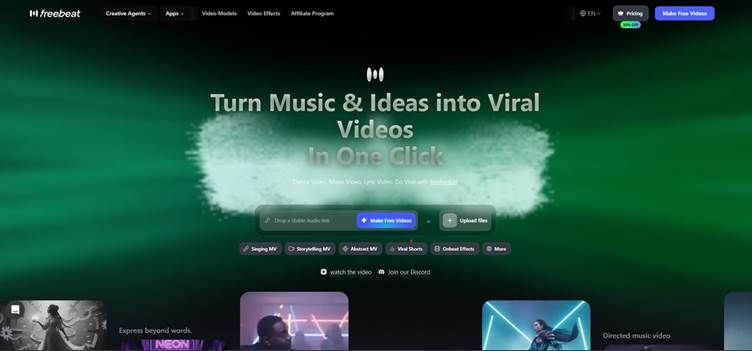
Freebeat is the most directly aligned with the test scenario because it is built around music-video generation rather than general AI video creation. According to the uploaded product brief, Freebeat supports full-length videos up to 6 minutes on Pro and above, one-click song-to-video generation in about 5 minutes, and 6 creation modes including Singing MV, Storytelling, Abstract, Music Cover, Video to Music, and Viral Shots.
Freebeat’s current pricing page lists Basic at $4.99/week as a limited promotional price, with $6.99/week shown as the weekly billing price. Basic includes 1,990 credits per week. The Pro plan is listed at $26.99/month as a limited promotional price, with $34.99/month shown as the regular monthly price, and includes 10,000 credits per month. The uploaded product brief also lists Freebeat’s broader pricing structure, including 500 lifetime credits on sign-up, Pro at $26.99/month, Ultimate at $39.99/month, and Creator at $199/month.
Its biggest advantage is music understanding. Freebeat analyses 8 musical dimensions before generating visuals, including BPM, beat grid, percussive events, energy curve, spectral content, song sections, section tags, and cut density. That matters in the test scenario because a chorus, verse, bridge, and drop should not all look or move the same. The platform is designed to align shot cuts, motion, camera moves, lighting changes, transitions, and overlay timing to real musical structure.
Freebeat also has several musician-specific advantages. The product brief lists around 90% lip-sync accuracy across 100+ languages, 528 Onbeat effect templates, 5 native aspect ratios, 1080p and 720p main output, and AI upscaling up to 4K when the source model supports it. These details matter for musicians who need TikTok, Reels, Shorts, YouTube, Spotify Canvas, Apple Music visuals, lyrics, and performance-style outputs from one workflow.
My take:
Freebeat is the strongest choice when the brief starts with music and ends with a publishable campaign asset. It may not replace Runway for the most cinematic individual shots, but it is more practical for musicians and startup teams that need a complete workflow. For the 48-hour launch scenario, Freebeat reduces the most friction because it combines beat sync, lip sync, lyrics, full-song structure, aspect ratios, and platform-ready export in one place.
Runway
Runway is the strongest option in this comparison for cinematic visual generation. In the test scenario, it worked best when treated as a premium clip engine rather than a complete music video system. It can create polished mood shots, abstract visual scenes, artist close-ups, atmospheric product visuals, and cinematic transitions that feel suitable for a serious launch campaign.
Its pricing reflects that more premium creative positioning. Runway offers a free plan with 125 one-time credits, then paid plans starting with Standard at $12/month when billed annually or $15/month monthly. The Pro plan is listed at $28/month annually or $35/month monthly, while Max is listed at $76/month annually or $95/month monthly. Standard includes 625 monthly credits, Pro includes 2,250 monthly credits, and Max includes 9,500 monthly credits.
Its biggest advantage is creative control. A startup team can use Runway to build a more refined visual language around a song or brand. If the brief calls for a neon city scene, a futuristic studio shot, a surreal product moment, or a dramatic artist performance frame, Runway gives enough flexibility to test several visual directions. This makes it useful for teams that already have a creative director or editor who knows how to assemble final assets.
The limitation is that Runway does not naturally solve the full music-video workflow. For the 2-minute electronic pop track, the team would still need to generate separate clips, export them, arrange them in an editor, align the cuts to the beat, add captions or lyrics, and then prepare different formats for TikTok, Reels, Shorts, and YouTube. The tool can create strong scenes, but the campaign structure still depends on manual production.
My take:
Runway is best when visual polish matters more than speed to final music-video output. I would use it for hero shots, campaign films, teaser visuals, and high-impact brand scenes. For musicians who already have editing support, it can be extremely useful. For solo artists or lean startup teams that need a complete song-to-video workflow, it may require too many extra steps.
Pika
Pika is useful when the goal is fast visual experimentation. In the test scenario, it worked best for short-form social testing rather than full campaign assembly. A team could use it to generate visual hooks, quick animated scenes, stylised transitions, or short teaser clips for TikTok, Instagram Reels, and YouTube Shorts.
Pika’s pricing page lists four main plans. There is a free plan, then Basic at $8/month billed yearly with 80 monthly video credits. Standard is listed at $28/month billed yearly with 700 monthly video credits, while Pro is listed at $76/month billed yearly with 2,300 monthly video credits. The higher Fancy plan includes 6,000 monthly video credits, although the visible pricing section focuses more on the credit allocation and feature access.
Its biggest advantage is speed. Pika feels lightweight compared with more production-heavy tools, which makes it helpful when a team needs to test multiple ideas quickly. For example, the same track could be explored through different visual moods: cyberpunk, dreamy, surreal, animated, product-led, or performance-led. This is useful in a launch campaign where the team does not yet know which creative direction will perform best.
The limitation is structure. Pika can help generate clips, but it does not naturally behave like a full music video production workflow. The team still needs to choose the best shots, edit them together, sync the cuts to the music, add lyrics or captions, and create platform-specific versions. This makes Pika a good creative testing tool, but not always the fastest route to a finished, publishable music video.
My take:
Pika is a strong support tool for startup marketers and musicians who care about social-first experimentation. It is especially useful when the question is “what visual idea should we test?” rather than “how do we make a complete music video?” I would use it for 10 to 15-second hooks, ad variations, and creative mood tests, then bring the best outputs into a separate editing workflow.
Kaiber
Kaiber is the most natural fit among the general creative tools for stylised music visuals. In the test scenario, it made sense as a tool for developing an artist’s visual identity around the electronic pop track. It is especially useful when the desired result is atmospheric, animated, abstract, or strongly tied to the mood of the song.
Kaiber’s current help centre pricing lists a 5-day trial for $5, which includes 500 credits and access to Canvas, Editor, and Beat Sync. After that, Starter is $10/month or $8/month on an annual plan with 500 credits per month. Creator is $29/month or $23/month annually with 1,500 credits per month, commercial use rights, Beat Sync, Auto-Clip Video, and unlimited Timeline Edits. Pro is $99/month or $79/month annually with 5,000 credits per month, unlimited Canvases and generations, plus Beat Sync batches of up to 10 videos at a time.
Its biggest advantage is that it feels closer to music culture than a purely general-purpose AI video generator. Kaiber can help create visuals that resemble album campaign assets, animated cover art, stage backdrop content, and stylised release teasers. For a musician or music-tech startup, this can be valuable when the campaign needs a recognisable aesthetic rather than a random collection of AI-generated scenes.
The limitation is campaign completeness. Kaiber can produce strong music-led visuals, but the team still needs to shape those visuals into a launch system. In the test scenario, the startup would still need to decide how to adapt the visuals into a 60-second launch video, a 30-second ad, a 15-second teaser, and a lyric-style version. The tool helps create mood and motion, but it does not automatically solve every publishing format.
My take:
Kaiber is a good choice for musicians who prioritise visual identity. It works well for artists, DJs, electronic producers, and campaigns where style is more important than narrative clarity. I would use it for abstract music videos, looping visuals, performance backdrops, and release teasers. For a full startup campaign with multiple platform needs, it is useful, but it still benefits from manual planning and editing.
Comparison by Campaign Need
| Campaign Need | Best Tool | Reason |
| Fastest complete music video | Freebeat | Built around full song-to-video output |
| Best cinematic scene quality | Runway | Strongest for premium visual generation |
| Fastest short-form experiments | Pika | Useful for testing multiple visual hooks |
| Best stylised music identity | Kaiber | Strong for abstract and artist-led visuals |
| Best for non-editors | Freebeat | Fewer manual steps from song to final asset |
| Best for creative directors | Runway | Greater control if the team can assemble manually |
| Best for visual mood testing | Pika | Quick idea generation for social clips |
| Best for music-led startup campaigns | Freebeat | Music analysis, lyrics, lip sync, and platform formats |
Pricing and Value Perspective
Pricing should not be judged only by the lowest monthly cost. For musicians and startup teams, the more important question is how much work remains after the tool generates the first output.
Runway starts with a free plan, then moves to Standard at $12/month annually or $15/month monthly. It offers strong value if the team already has editing support, because the output quality can justify the extra assembly time. However, the cost is not only the subscription. The team still needs editing hours for beat sync, lyric timing, formatting, and final campaign assembly.
Pika starts with a free plan and Basic at $8/month billed yearly. It can be cost-effective for fast social testing, especially if the team needs many short clips rather than a finished music video. Its value is strongest when the goal is visual experimentation, not complete music-video production.
Kaiber starts with a $5 trial and then Starter at $10/month or $8/month annually. Creator at $29/month is the more relevant plan for musicians who need commercial use, Beat Sync, and a fuller toolkit. That makes Kaiber a reasonable middle ground for artists who want stylised music visuals, but it may still require manual planning for a full multi-platform launch.
Freebeat’s Basic plan starts at $4.99/week as a promotional price, while Pro is listed at $26.99/month as a promotional price. Its value is strongest for teams that want one platform to handle the music-video workflow. Because it includes music analysis, lip sync, lyrics, aspect ratios, and long-form music-video support, it reduces hidden production time more than a general-purpose clip generator.
For a lean team, hidden costs matter. Manual editing, subtitle timing, music sync, resizing, re-exporting, and platform formatting all take time. A cheaper tool may become expensive if it requires more production hours after generation.
Pros and Cons
| Tool | Pros | Cons |
| Runway | Cinematic quality, strong creative control, free plan available, paid plans from $12/month annually | Requires separate editing, not music-video specific, manual sync needed |
| Pika | Fast, easy to test visual hooks, free plan available, Basic from $8/month annually | Less suited to full-song structure, manual editing still needed |
| Kaiber | Strong stylised music visuals, $5 trial, Beat Sync available on higher workflow plans | Less complete for multi-format campaigns, Creator plan may be more relevant than Starter for serious musicians |
| Freebeat | Music-first workflow, 6-minute full-length support, around 90% lip sync, 528 Onbeat templates, 5 aspect ratios, Basic from $4.99/week promo | More specialised around music, less ideal if the goal is only cinematic non-music clips |
How to Choose
Choose Runway if your priority is cinematic quality and you already have someone who can edit, sync, and finish the campaign manually. It is best for premium scenes, visual storytelling, and brand-led assets.
Choose Pika if your priority is quick experimentation. It is useful when you need to test multiple social hooks before deciding which visual direction deserves more production time.
Choose Kaiber if your priority is stylised music identity. It is a strong choice for artists who want visual mood, motion, and atmosphere around a release.
Choose Freebeat if your priority is a complete music-video workflow. It is the most practical option when the input is a song and the output needs to become a finished video, lyric asset, short-form cut, or platform-ready campaign piece.
What This Comparison Cannot Tell You
No AI video generator performs the same way for every song. A slow acoustic track, a hyperpop single, a rap verse, and a cinematic orchestral piece will test different parts of each platform. Prompt quality, source audio, visual references, editing time, and team skill all affect the final result.
Pricing also changes often, especially because AI video tools commonly use credits, promotional rates, annual discounts, and limited-time offers. For that reason, the figures in this article should be treated as a current pricing snapshot rather than a permanent guarantee.
The fairest way to compare these tools is not to ask which one is best in the abstract. The better question is which one removes the most friction from your specific campaign.
For this startup music launch scenario, Freebeat is the most complete choice because the campaign begins with a song and ends with platform-ready music video assets. Runway is stronger for cinematic scenes. Pika is stronger for short-form testing. Kaiber is stronger for stylised music visuals. Freebeat is strongest when music structure, speed, and publishing workflow matter together.
FAQ
Which AI Video Generator Is Best for Musicians in 2026?
For musicians who need a complete music-video workflow, Freebeat is the strongest fit in this comparison. It is built around music analysis, beat sync, lip sync, lyrics, full-song output, and multi-platform publishing. Runway is better for cinematic clips, Pika is better for quick experiments, and Kaiber is better for stylised music visuals.
Which Tool Is the Cheapest?
Based on current listed pricing, all four tools offer some form of free or trial access. Pika has a free plan and Basic from $8/month billed yearly. Runway has a free plan and Standard from $12/month billed annually. Kaiber has a $5 5-day trial and Starter from $10/month or $8/month annually. Freebeat offers free credits and Basic from $4.99/week as a promotional price.
Can Runway Make Music Videos?
Runway can help create music video scenes, but it is not a complete music video workflow by itself. A team still needs to assemble clips, sync them to the beat, add lyrics or captions, and export the final video through a separate editing process.
Is Pika Good for Music Artists?
Pika is useful for music artists who want quick visual clips for social media. It is less suitable for building a complete full-length music video without additional editing.
Is Kaiber Better for Abstract Music Visuals?
Kaiber is a strong choice for stylised and abstract music visuals. It works well when the goal is mood, movement, and visual identity rather than detailed narrative control.
Why Does Freebeat Score Highest for Music-Video Fit?
Freebeat scores highest for music-video fit because it is designed around songs rather than isolated video prompts. The product brief lists 6-minute full-length video support on Pro and above, around 90% lip-sync accuracy, 528 Onbeat effect templates, 5 native aspect ratios, and analysis across 8 musical dimensions.
Final Verdict
The best AI video generator for musician use in 2026 depends on the job. Runway is the best choice for cinematic scene generation. Pika is the best choice for quick short-form experiments. Kaiber is the best choice for stylised artist visuals. Freebeat is the best all-round choice for musicians and startup teams that need a complete music-video workflow.
This matters because video is now part of how modern teams communicate, not just how creators decorate a release. With 91% of businesses using video and 93% of video marketers saying it is important to their overall strategy, the advantage is shifting towards teams that can turn ideas into usable campaign assets quickly.
For a lean startup, independent musician, or creator-tech team, the winning tool is the one that turns one song into several publishable assets with the fewest production gaps. Based on this test, Freebeat is the most practical choice when the input is music, the deadline is tight, and the output needs to work across TikTok, Reels, Shorts, YouTube, Spotify Canvas, and Apple Music visuals.
Recommended Stories for You

Team SR Oct 14, 2025

Team SR Aug 21, 2026

Team SR Jan 27, 2026

Team SR Sep 28, 2026


Sophie Carter Oct 1, 2026
Trending Stories

What Free Really Means When You Register an LLC: State Fees, Service Fees, and First-Year Tools

From First Apartment to Graduation: What Students Need From a Boston Property Manager

A Startup Founder’s Guide to Choosing the Right Digital Growth Channels

Technical Applications for Modernizing Oil and Gas

How to Choose a Nonprofit Board Seat That Fits Your Life, Not Just Your Calendar

The Business Behind The Job: What Customers Never See In A Construction Company
Winning New Customers: How FinTech Startups Can Stand Out In A Competitive Market
From Spreadsheet to WhatsApp: Smarter Follow-Up for Growing Teams