

The Best Booking Software for Small Business Owners Who Want to Stop Managing Schedules Manually
Oct 9, 2026 | By Sophie Carter
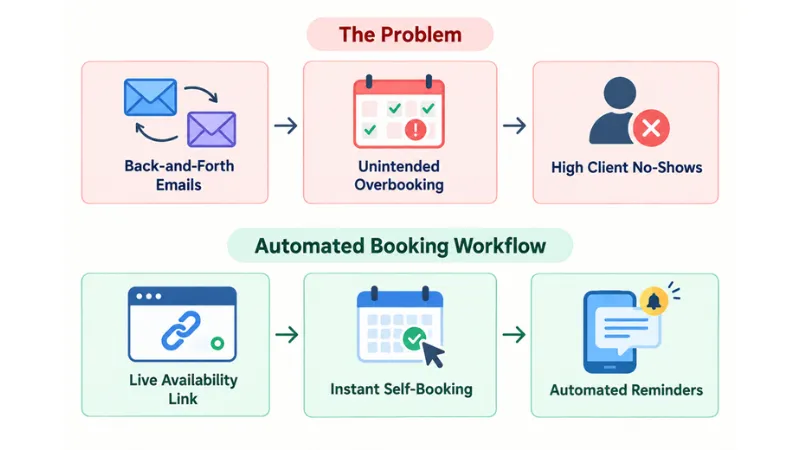
The best appointment booking software available for business organization will assist in scheduling and making of appointments with more ease for you. You will have your schedule updated, payment done instantly, and will be able to receive quick reminders for your clients. Such software will make it impossible for clients to fill in any documents. It will help in preventing clients from being no-shows and in avoiding scheduling mistakes.
 Follow us
 Follow us
Hidden Cost of Making Appointments through Manual Scheduling
Appointment making and scheduling through text messages, phone calls, and manual methods may result in several issues for both business owners and clients. It may result in revenue loss because of time consumption and inefficiency when a worker spends too much time every week scheduling meetings.
Introducing a modern solution will allow business owners to manage daily appointments without issues. This is achieved through automation of the process of client reception, as well as through synchronization of calendars regardless of time zone. The latest scheduling tools have easy-to-use portals, which will allow clients to view available hours, book their slots, and make an instant payment.
Manual Scheduling Pain Points:
Top Booking Software Solutions Compared
Different industries need special ways to set up schedules. Here is a list of the best platforms. It looks at how they work, what they cost, and what features they offer.
RECOMMENDED FOR YOU


| Platform | Ideal Business Model | Key Feature | Pricing Model |
| Acuity Scheduling | Service Providers & Studios | Advanced intake forms & custom intake logic | Paid plans from $16/mo |
| Square Appointments | Salons, Retail & In-Person POS | Built-in point-of-sale & inventory tracking | Free solo tier; paid team tiers |
| Setmore | Budget-Conscious Teams | Generous free tier supporting multiple staff | Free tier; paid from $5/mo |
| SimplyBook.me | International & Multi-Location | Support for 30+ payment gateways and 100+ languages | Free tier; paid from $11.90/mo |
| Calendly | Consultants & B2B Services | Seamless calendar routing & team round-robin | Free basic; paid from $10/mo |
Key Features to Demand in Your Booking Platform
To get good returns over time, smart business owners go past simple calendar setups. They check four key parts:
1. Two-Way Calendar Synchronization
Your scheduling tool needs to work in both directions with Google Calendar, Outlook, and Apple iCal. This makes sure that your plans and appointments will block business time without you having to do anything. It helps stop you from booking something twice.
2. Automated SMS and Email Notifications
According to business technology insights, automated reminder steps help greatly to cut down on last-minute cancellations and client no-shows. Try to find tools that let you set your own timing for SMS alerts and email confirmations.
3. Native Payment Gateway Integration
Taking deposits or all of the fees when someone books helps make sure they will show up. Software that works well with payment tools like Stripe and PayPal helps the money come in faster. This also helps stop lost money when people do not keep their appointments.
4. Custom Intake Forms and Lead Routing
Make sure to collect vital information about your clients prior to booking appointments. Flexible booking forms let you add your custom questions, intake forms, or file upload fields to the booking checkout process.
Booking System Installation Process
The transition from traditional scheduling to an automated one should be seamless and smooth. Here are a few things to do before launching your booking system:
Set Up Working Hours and Breaks
Specify your working hours for each staff member. Also, set a 15-minute break between every two appointments to avoid staff burnout.
Set Up All Calendars for Visibility
Link all your calendars so that the availability of your staff is up-to-date at all times. Make sure to sync all your calendars in real-time so that double-booking does not occur.
Set up Payment and Deposit Rules
Automate the payment process by setting up rules that require clients to pay for popular time slots in advance. It will reduce the number of clients who fail to show up for their appointments.
Set Up Booking Widget on All Websites
Add your booking widget to the header of your website, the footer of your email, and your social media accounts. It will make your booking system easier to access for anyone searching for your business online.
With the right preparations, automated booking systems allow growing businesses to remain in control of their booking process without having to spend hours doing it manually. The booking system suggested above will reduce overhead, automate tedious tasks for the staff, and offer an excellent customer experience.
Conclusion
Automating your appointment calendar helps small business owners get more done. It lets you take care of things with smart scheduling software, so you have more time to work. It also helps keep clients happy and make sure their visit goes well from beginning to end. If you want to read more about modern web tools and software for your work, look at what W3C has to offer. Choosing the right software for your business helps your work stay steady and lets your business grow.
Recommended Stories for You

Sophie Carter Oct 5, 2026

Team SR Jul 3, 2026

Team SR Sep 19, 2026

Team SR Jan 22, 2026

Team SR Dec 16, 2025

Team SR Nov 13, 2025
Trending Stories

How Caribbean Businesses Are Rethinking Online Sales as Global E-Commerce Changes

When Social Media Doesn’t Work: Multi-channel Marketing for B2B

Building a Trustworthy Sender Reputation From Day One

What to Ask Before Hiring a Lawyer for a Family Estate Dispute

Buying a Second Hand Car as a Company Vehicle for a Start-Up: Is It a Good Idea

World of Warcraft: Mists of Pandaria Classic – Terrace of Endless Spring Raid Guide

How Startups Can Scale Customer Support Without Growing Their Team
Funding the Future of Home Technology & Design