

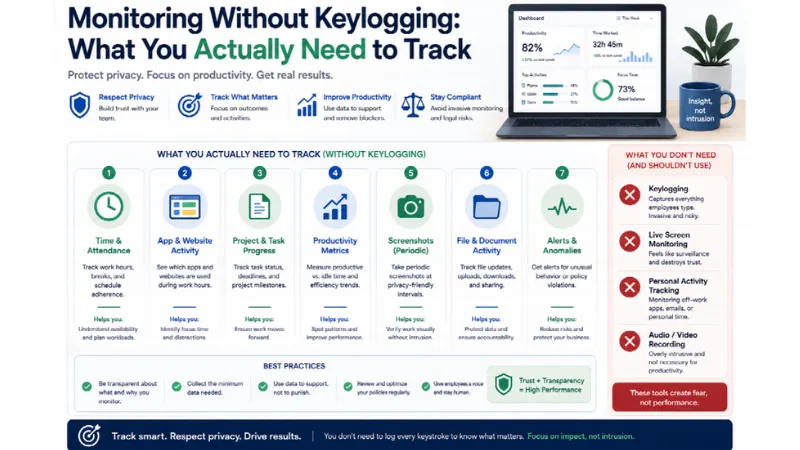
Keystroke logging captures every character an employee types — passwords, private messages, medical searches, and the occasional line of useful evidence. For nearly every business question a manager actually has, cheaper signals answer it better.
 Follow us
 Follow us
The exception is worth stating up front, because most articles on this topic pretend it does not exist: for forensic investigation of a specific security incident, keystroke content provides reconstruction that nothing else matches. That is a narrow, security-driven use case with a documented trigger. It is not what most organisations deploying employee computer monitoring are trying to do, and buying it for productivity purposes means acquiring a compliance obligation to answer a question you could have answered another way.
What keylogging is, and what it drags in
A keylogger records the character stream. It does not distinguish a project brief from a password field, a work email from a message to a doctor, or a company document from an employee's personal banking login.
Three consequences follow automatically.
RECOMMENDED FOR YOU



Credentials enter your systems. Every password an employee types on that machine — including personal accounts and, in many setups, credentials for systems you do not own — lands in your monitoring database. You now hold data you cannot legitimately use and must protect.
Regulated data enters scope. In healthcare, an employee typing patient details creates protected health information inside a productivity tool. In finance, the same happens with non-public information. The tool was not designed for that data and probably is not certified to hold it.
The compliance burden multiplies. This is the point most buyers miss. Tools capturing content require explicit consent handling, a data protection impact assessment, and documented legitimate interest under GDPR. Tools capturing only metadata — application names, domains, time, whether input occurred — avoid processing sensitive personal data, and the compliance work drops accordingly.
That difference is not marginal. It is the gap between a deployment your data protection officer signs off in an afternoon and one that needs weeks of assessment.
The question behind the question
Nobody wants keystroke data for its own sake. They want an answer to something. Match the question to the cheapest signal that answers it.
What you actually want to know Signal that answers it Keylogging needed? Were these hours worked Clock-in/out plus activity levels No Was the person at the machine Input frequency, not content No What was worked on Application and window titles No Which client to bill Project attribution at capture No Is the team overloaded Aggregate hours and workload distribution No Did the work get done Deliverables, cycle time No Is someone visiting risky sites Domain-level web logs No Did data leave the company File and USB transfer logs, DLP No What exactly did they type during the incident Keystroke content Yes
Eight of nine common questions resolve without content capture. The ninth is a security investigation, and organisations that genuinely need it usually know because they have a security function, a documented trigger, and a review process.
What to track instead
Five signal types cover the practical range.
Activity levels — input frequency without content. The distinction WorkTime calls a keystroke counter and Monitask implements as ten-minute activity windows: the system records whether keyboard and mouse input occurred, not what was pressed. You get engagement data with no content in the database. Monitask's implementation treats above 50% as a normal working level and captures nothing about the characters themselves.
Worth being honest about the limitation: this measures presence at the keyboard, not output. Reading, thinking, and calls score low. It answers "was someone there," not "was the work good."
Application and window activity. Which applications ran, for how long, and which window had focus. This is the highest-value signal in the set and the most underused — it answers what the work was, which is usually the actual question.
Domain-level web logs. That an employee visited a news site, not which article. Domain resolution catches policy violations and time sinks while leaving out the specifics that reveal health conditions, financial trouble, and political views. Full-URL capture is a materially different privacy posture, and many tools gate it to higher tiers — Monitask puts full URL and page tracking on Business Premium rather than entry plans, which lets you deliberately not collect it.
Screenshots, where evidence is required. More invasive than any signal above and less invasive than keystroke content, since they capture a moment rather than a stream. Justified where visual proof of work is contractually needed — agency billing, contractor verification. Not justified as a default.
File and device activity. For data-loss concerns, what actually matters is files copied to USB, uploaded to unapproved cloud storage, or moved in bulk. This addresses the security question directly instead of routing through everything a person types.
The specific cases people cite for keylogging, and what replaces them
"We need to catch data leaks." File transfer logs, USB device control, and upload monitoring detect exfiltration directly. Keystroke content tells you someone typed a password; file logs tell you 4GB left the building.
"We need proof of work for clients." Time attribution plus application logs plus screenshots plus deliverables. Clients want to see the work, not the typing.
"We need to measure productivity." Keystroke volume correlates poorly with output — an employee mechanically clearing routine email types more than one designing an architecture. Application data and completed deliverables measure the thing you care about.
"We need to detect fake activity." Correlation of signals catches this better than counting keystrokes. Mouse movement with no keyboard input, no application changes, and no files produced is the mouse-jiggler pattern, and no content capture is required to see it.
"Compliance requires it." Rarely true, and worth checking rather than assuming. Most frameworks require access logs, audit trails, and demonstrated controls — not transcripts of what people typed. Some regulated contexts do require content inspection, and those organisations have compliance teams who can state the requirement precisely.
The costs of capturing content
Attrition. Around 46% of technical workers report they would leave over keystroke logging or screenshot capture. With replacement costing 50–200% of annual salary, two departures wipe out any plausible monitoring saving.
Data quality. Employees who feel surveilled manage appearances — around 24% of monitored workers already take fewer breaks to avoid appearing idle. Harvard Business Review research found monitored employees more likely to take unapproved breaks and disregard instructions. You end up measuring compliance behaviour rather than work.
Breach exposure. A keystroke database is a credential database. Its value to an attacker exceeds most of what else you hold, and holding it means defending it.
Legal overhead. Consent handling, impact assessments, retention policies, and access controls, all heavier than for metadata. Several jurisdictions treat content capture as requiring specific justification.
What a non-keylogging stack looks like
For most organisations, this configuration answers the real questions with the least exposure:
- Session-based capture — running only between clock-in and clock-out, so off-hours activity stays out entirely
- Activity levels from input frequency, no content
- Application and window tracking
- Domain-level web logs, full URLs off unless a specific need exists
- Screenshots only where billing or contracts require them, at the lowest useful frequency
- File and USB monitoring if data loss is a genuine concern
- Employee self-view of their own data
- Retention matched to your dispute window, then automatic deletion
Several tools support this directly. Monitask, ActivTrak, Hubstaff, Time Doctor, and Prodoscore all capture no keystroke content; Teramind, Veriato, Controlio, and CurrentWare do at upper tiers. If you buy from the second group for productivity purposes, disable the capability and document that you did.
When keylogging is genuinely justified
Three conditions, and all three should hold.
A specific security mandate, not a general productivity goal — insider threat programs, regulated environments with content inspection requirements, or an active investigation with a documented trigger.
A review function. Someone reads the output within a defined process. Content capture with nobody reviewing it is a liability with no offsetting benefit.
Legal sign-off in every relevant jurisdiction, with disclosure, defined retention, restricted access, and an audit trail of who viewed what.
Missing any of the three means the capability is exposure without return.
Frequently asked questions
Is keystroke logging legal?
Generally permitted on company-owned devices in the US with appropriate notice, and several states require written notice for electronic monitoring. Under GDPR it requires specific justification and typically fails a data minimisation test where less invasive signals would answer the same question.
What is the difference between a keylogger and a keystroke counter?
A keylogger records the characters typed. A keystroke counter records that typing occurred and at what rate, without capturing content. The second provides engagement data with no personal content entering your systems, which is why most productivity tools use it.
Can you monitor productivity without keylogging?
Yes, and generally better. Application and window activity, time attribution, activity levels, and deliverables answer productivity questions more directly than keystroke volume, which correlates poorly with output.
Which monitoring tools do not log keystrokes?
Monitask, ActivTrak, Hubstaff, Time Doctor, and Prodoscore capture no keystroke content. Teramind, Veriato, Controlio, and CurrentWare offer it at upper tiers, where it can usually be disabled if you bought the platform for other reasons.
Does keylogging help detect data leaks?
Not efficiently. File transfer logs, USB device control, and cloud upload monitoring detect exfiltration directly, while keystroke content mostly captures credentials you should not be storing. Address data loss at the data layer rather than the input layer.
Do employees know if keystroke logging is enabled?
Not reliably, since agents can run without visible indicators. Several jurisdictions require disclosure regardless, and undisclosed content capture is the configuration most likely to produce both legal problems and resignations if discovered.
Is screenshot capture better or worse than keylogging?
Less invasive in one sense — a moment rather than a continuous stream — but it captures whatever is on screen, including personal content in other windows. Both sit above metadata-based signals in exposure; screenshots are justified where visual proof of work is contractually required.
What should we do if our current tool has keylogging enabled?
Check whether anyone uses the output. If not, disable it, document the change, and tell the team — turning a capability off is one of the few credible trust signals available. If it is being used, confirm the legal basis, the review process, and retention before continuing.
Recommended Stories for You

Team SR Nov 14, 2025

Team SR Feb 14, 2026

Team SR Dec 24, 2025
Sophie Carter Sep 30, 2026

Team SR Jun 9, 2026

Sophie Carter Oct 12, 2026
Trending Stories

A Startup Founder’s Guide to Choosing the Right Digital Growth Channels

Technical Applications for Modernizing Oil and Gas

What Free Really Means When You Register an LLC: State Fees, Service Fees, and First-Year Tools

How to Choose a Nonprofit Board Seat That Fits Your Life, Not Just Your Calendar

Winning New Customers: How FinTech Startups Can Stand Out In A Competitive Market

From Spreadsheet to WhatsApp: Smarter Follow-Up for Growing Teams

From First Apartment to Graduation: What Students Need From a Boston Property Manager

The Business Behind The Job: What Customers Never See In A Construction Company