


Startups often need marketing visuals before they have a dedicated design team. A landing page, product announcement, social campaign and investor presentation can all require different imagery in the same week. An ai image generator can help explore concepts quickly, but useful marketing still starts with a clear customer problem and an accurate promise.
 Follow us
 Follow us
The goal is not to fill every channel with generated artwork. It is to identify where original illustrations or backgrounds add clarity, where authentic product imagery is essential, and how to test whether a visual helps people understand the offer. In Dreamina, teams can explore concepts using prompts or authorized references and compare the outputs with the intended message before committing to a design.
Start with the customer problem
Before generating an image, answer three questions: Who is the audience? What problem does the startup solve? What should viewers do next?
A scheduling software startup, for example, might target independent tutors who spend too much time arranging lessons. Its marketing image could show a simple visual metaphor for organized time. A generic picture of a smiling executive at a laptop would be less specific and could make the offer harder to understand.
RECOMMENDED FOR YOU

What No One Tells You About Hiring a Game Development Partner for the First Time
Team SR
Apr 24, 2026

Write one headline and one sentence explaining the benefit. Use those as the creative brief. If the image cannot support that message, reconsider the image rather than rewriting the product promise around it.
Decide which images should be generated
AI imagery is most useful when the asset is conceptual: a background, an illustration of a customer problem, an abstract metaphor or a seasonal visual. It is less appropriate when buyers need factual proof.
Use real product photographs when appearance, materials or dimensions matter. Use genuine screenshots for software interfaces. Avoid fabricated testimonials, fictional employee portraits presented as real staff, or generated dashboards implying results the company has not achieved.
A practical asset plan might include one conceptual hero illustration, an authentic product screenshot, a customer-facing explanatory graphic and a simple social teaser. Each plays a different role in building trust.
Build one visual system across channels
Consistency matters when a new brand has limited recognition. Choose a restrained palette, a small set of type styles and a recurring visual treatment. An illustration on a landing page can share colors and shapes with social graphics without being copied unchanged.
Design for each format. A website hero may need open space for a headline and call to action. A social feed post needs a strong focal point at small size. An email banner should be legible on mobile. Important words, prices and product claims belong in editable text, not inside generated artwork.
Save the approved prompt, source files and final layout. This reduces repeated creative decisions when the startup publishes its next campaign.
Write prompts that serve a business goal
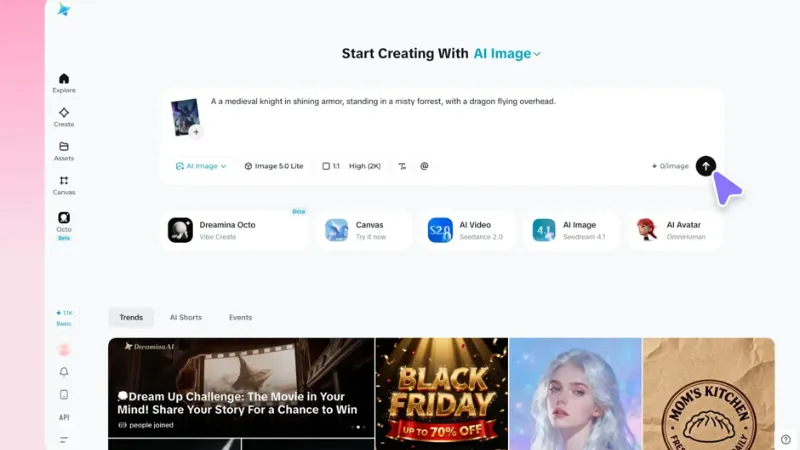
A prompt should specify the subject, composition, mood and empty space for copy. For the scheduling startup, try:
“Clean editorial illustration of a desk with a notebook, calendar cards and neatly arranged stationery, warm neutral palette with one teal accent, simple geometric shapes, objects positioned on the right, generous clear space on the left for a headline, no logos or lettering.”
The prompt supports a specific landing-page layout rather than asking for a vaguely “professional” picture. Compare a few versions under the real headline. Reject any version that introduces confusing symbols, unreadable pseudo-text or irrelevant details.
When evaluating a best free ai image generator, test whether it produces usable compositions and offers suitable export options, not simply whether the first image looks impressive. Review current licensing and commercial-use terms before publishing.
Create a simple campaign from one idea
Imagine a startup launching a booking tool for tutors. The campaign promise is “Spend less time scheduling and more time teaching.” Begin with a landing-page hero illustration showing an orderly workspace. Place the headline and a real product screenshot nearby so visitors can connect the concept to the actual service.
Next, adapt the same visual style for a social post with a single practical message: “Still coordinating lessons through long message threads?” Link it to a landing page that explains the tool accurately. Then create an email banner using the same palette and an even simpler composition.
These are three distinct assets, not three random images. They share a customer problem, recognizable visual cues and one clear next step. That makes the campaign easier to evaluate.
The accompanying conceptual image illustrates the role of original artwork in an early campaign. It should be treated as a visual concept, not as evidence of the startup's actual office, customers or product performance.
Keep human editing in the workflow
AI-generated images often need adjustments before they become marketing assets. Inspect edges, hands, reflections, text-like marks and any objects that might be mistaken for real product features. Crop the image for the intended placement and add verified copy in an editable layout.
Ask someone unfamiliar with the startup what they think the image is advertising. If their interpretation differs from the intended offer, simplify the visual or clarify the surrounding copy. This quick review can reveal problems that are easy to miss after staring at the design for hours.
A designer or marketer should make the final decision about hierarchy, brand consistency and factual accuracy. Generation speed does not remove the need for judgment.
Protect customer information and creative rights
Do not upload confidential customer records, unreleased designs or private photographs without permission and a clear understanding of how the service handles them. Check the tool's current terms for commercial use and the source material's rights.
Avoid copying another company's recognizable branding or presenting synthetic people as real customers. For sensitive industries, review whether visual claims could be misleading even when the image contains no explicit words.
Keep records of approved references, final assets and the purpose of each image. That makes later revisions and compliance checks more manageable.
Measure whether the creative helps
A beautiful image is not necessarily an effective one. Choose metrics tied to the campaign goal. For a landing page, look at relevant sign-ups or qualified inquiries, not just page views. For a social post, engagement may help explain audience interest, but the quality of resulting visits matters too.
Test a small number of meaningful alternatives. For example, compare a literal product-focused hero with a conceptual illustration while keeping the headline, audience and offer consistent. Changing everything at once makes results difficult to interpret.
If one variation performs better, ask why. Did it explain the service more clearly? Was the product easier to recognize? Did the composition make the call to action more visible? Use those observations to guide the next creative brief.
Avoid common startup mistakes
One mistake is using an AI-generated interface instead of a real screenshot. It may look sophisticated while promising functions the product lacks. Another is producing many unrelated styles because each individual image looks attractive. A third is spending hours perfecting backgrounds while the offer remains vague.
Set a practical approval checklist: Does the visual communicate the intended customer problem? Are all product details accurate? Is the copy readable on mobile? Are usage rights clear? Is the next action obvious?
If the answer to any question is no, revise before scaling the campaign.
A lean process for the next launch
For a first campaign, select one audience, one customer problem and two primary channels. Write the message before creating images. Generate a small set of conceptual options, combine the strongest with authentic product information and review the complete layouts.
Publish the assets, compare results with the campaign objective and document what you learned. Reuse the successful visual rules rather than repeating the same picture everywhere.
AI-generated images can help a startup move from an idea to a testable campaign without a large production budget. Their real value comes from faster exploration paired with accurate claims, consistent design and thoughtful measurement.
Recommended Stories for You

Team SR Mar 6, 2026

Team SR Sep 8, 2026

Team SR Oct 21, 2025

Team SR Jul 15, 2026

Team SR Aug 18, 2026

Team SR Feb 20, 2026
Trending Stories

A Question People Actually Search: Why Does Recovery From Surgery Take So Long?
How Ecommerce Startups Can Build a Lean Shopify Team

How to buy Tether TRC20 (USDT) for PayPal dollars (USD) with maximum benefit?
Why Hands-On Project Oversight Still Matters in Home Remodeling
My Honest RiseGuide Review 2026
A Small British Pub Makes $10,000 a Month from Shared Power Banks — A Profitable Side Income Story

What Startups Should Think About Before Moving Into Their First Commercial Premises

Understanding Residential Proxy Networks and How They Protect Online Privacy