

 Follow us
 Follow us
Your startup might have a small team. But there is a surprising amount of work to be done. Someone is building the landing page. Someone else prepares social posts, Product Hunt materials, and more. The product team is testing the release, and sales is getting its materials ready.
With a fixed launch date, every task here needs an owner. Also a deadline. When updates sit across disconnected tools, your team is sure to miss an important step until the final week. Deal with these issues with the right launch planning tools. It’s the best way to give everyone a shared view of the work and the progress.
Why do product launches go off track?
There are a few recurring planning problems that can cause issues for your team.
- Different team deadlines: Marketing and product may work from separate schedules. Their deadlines can conflict, leaving one team waiting for another.
- Missed dependencies: Paid advertising may depend on a finished landing page. Email announcements may need approved product screenshots. Delays are inevitable if your team overlooks all these connections.
- Uneven workloads: One person ends up taking care of several urgent tasks during launch week. Others have more capacity, but it remains unused.
- Scattered information: When task updates live in different files and conversations, nobody gets a reliable view of the complete launch plan.
Shared schedules here are a must as they help teams coordinate better. For more marketing planning software that keeps it all on one timeline, explore the full list here.
What does a startup need from a launch planning tool?
What does it take for the full team to stay on the same page? You are going to need a launch planning tool. Organize all the work effortlessly. It’s not about creating another complicated process for your team. Here is what you need to look for.
- Timeline or calendar: Find task deadlines and launch dates all in one place. Track all activities from a unified platform.
- Task dependencies: Connect related tasks and let teams see what needs to happen before the next task begins.
- Collaboration: Assign tasks and share updates with your team and external partners.
- Quick setup: Start with a template. Even a simple workspace should be a great starting point.
- Affordable pricing: Check free plans and entry-level subscriptions to try out the features before committing.
Top 6 marketing planning tools for your launch
1. GanttPRO
Best for: Startups coordinating product and sales activities against one launch date.
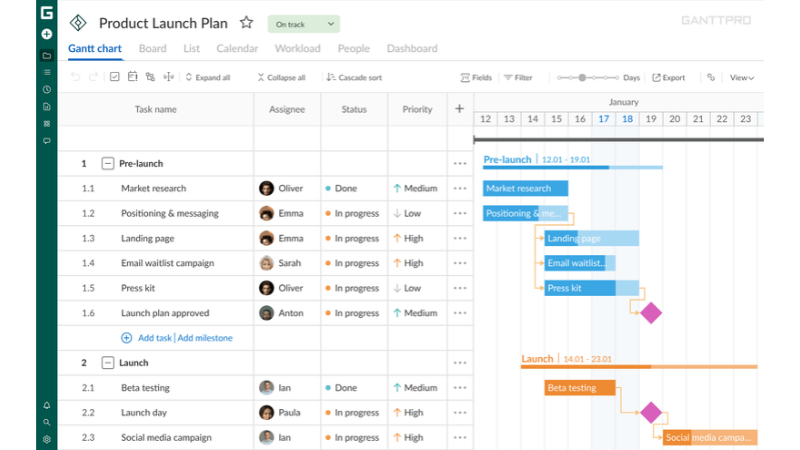
How it helps at launch: GanttPRO gives your team a visual Gantt chart for planning the full launch schedule. Create tasks for each stage of the process and then connect dependent activities. Milestones can mark important checkpoints. Templates help teams organize recurring work, while workload management gives managers a view of team capacity on the Business plan. External stakeholders can review project progress through shared private links.
Watch out for: GanttPRO is a paid project management platform after its 14-day free trial. Core starts at $7 per user per month. That’s with annual billing.
2. Planable
Best for: Startups preparing social posts and coordinating content approvals.
How it helps at launch: Get Planable to bring all your social content into a shared calendar. Draft launch announcements and schedule posts effortlessly and review how content will appear before publication. Color-coded labels and campaign organization help separate product announcements from teaser posts and follow-up content. You then have approval workflows with Planable to give your team a clear way to review drafts before they go live. Planable’s Basic plan supports 60 posts per workspace each month and access for unlimited users.
Watch out for: Planable focuses on content coordination rather than managing the full product launch. Basic plan starts at $33 per workspace per month.
3. Nuclino
Best for: Small teams that need one organized place for product information and launch documents.
How it helps: Nuclino is a shared knowledge base. Use it for launch briefs and product positioning. Create linked pages to connect related information and use the graph view to understand how each of the documents relates. Real-time collaboration features are also available with Nuclino so you can update briefs and review information together with the team. Nuclino’s free plan includes up to 50 items and three canvases. That’s more than enough for a small launch project.
Watch out for: Nuclino is made for documentation and knowledge sharing. If you need detailed scheduling features and dependency management, you will need to look for other tools.
4. Kanban Tool
Best for: Startups that prefer a visual board for tracking work.
How it helps at launch: Visual boards make tracking tasks so much easier. What’s better than dedicated Kanban board software like Kanban Tool? Move tasks effortlessly between stages like To-Do and Done, so teams stay updated all the time. Kanban Tool brings support for swimlanes that can separate work based on department or priority. Work-in-progress feature limits people from taking on too many tasks. Each task here is a card. Assign each card to an owner. The free plan gets you support for two users and two boards.
Watch out for: The board-based approach has very little emphasis on the complete launch timeline. The Team plan starts at $6 per user per month.
5. Stackby
Best for: Startups managing many marketing assets and distribution channels
How it helps at launch: If spreadsheet-style tables are more important to your workflow, Stackby can be a good pick for you. Build a comprehensive launch tracker with columns for marketing channels, asset names, assigned owners, approval status, and publication dates. Then, you have forms. These can collect information from contributors. It’s a great structure that works well for tracking a growing collection of launch materials. With the free plan, you are getting support for up to five editors. It’s generous enough for a small team that is just testing workflow.
Watch out for: You need to build your custom launch tracker and workflow. Paid plans for Stackby start at $9 per user per month (billed monthly).
6. EmailOctopus
Best for: Startups building subscriber lists and sending product updates.
How it helps at launch: Prepare announcement emails and follow-up campaigns effortlessly with EmailOctopus with its drag-and-drop editor. Email templates make the process even more seamless, even if you have no experience. With EmailOctopus, organize subscribers into lists and create automated sequences. Collect sign-ups more than ever with stunning custom landing pages. The tool is relevant even after launch. Collect campaign reports to see how well your email campaigns are performing. EmailOctopus’s free Starter plan supports up to 2,500 subscribers and 10,000 emails in a month. Limits reset after 30 days.
Watch out for: EmailOctopus is for email marketing. You don’t get a wider launch schedule, so consider this when choosing. Pro plans start at $9 per month for 500 subscribers (that’s only for annual billing).
Startup launch planning tools in a nutshell
| Tool | Best for | Timeline view | Price |
| GanttPRO | Complete launch planning | Gantt chart | From $7/user/month |
| Planable | Social content planning | Calendar | From $33/workspace/month |
| Nuclino | Launch documentation | Graph and board view | From $6/user/month (billed annually) |
| Kanban Tool | Task tracking | Kanban board | From $6/user/month |
| Stackby | Asset and channel tracking | Table views | From $9/user/month (billed monthly) |
| EmailOctopus | Email campaigns | Campaign scheduling | From $9/month (billed annually) |
RECOMMENDED FOR YOU


How European Startups Prepare for a Seed Round Before Talking to Investors
Sophie Carter
Sep 30, 2026
A simple 6-week product launch plan
| Period | Main activities |
| Week 6 - 5 | Finalize product positioning. Define the target audience. Set launch goals. |
| Week 4 - 3 | Build the landing page Create social content. Create the visuals. Prepare emails. |
| Week 2 | Invite beta users. Review launch materials. |
| Week 1 | Complete the launch checklist. Schedule social posts. Prepare the Product Hunt submission |
| After launch | Collect feedback. Review campaign results. Plan the next product updates. |
You need to have proper milestones for all your important tasks like final content approval and beta completion. Keep things aligned on launch day. Connect dependent tasks and review the schedule regularly. This should give you maximum opportunity to adjust task owners if there is any change in workload.
Closing thoughts
Heading into launch day, your startup needs a concrete launch plan. A plan that the team can follow. We’ve rounded up the tools that make it all more seamless. Each of these tools here has a clear part to play in the launch. It all depends on what your actual workflow is. So be wise to choose the tool that takes care of the biggest planning challenges you face. A shared schedule and realistic milestones are what you need to give your startup a stronger foundation for launch.
Recommended Stories for You

Team SR Nov 24, 2025

Team SR Jun 24, 2026

Team SR Jul 27, 2026

Team SR Jul 20, 2026

Team SR Jul 15, 2026

Team SR Apr 28, 2026
Trending Stories

World of Warcraft: Mists of Pandaria Classic – Terrace of Endless Spring Raid Guide

How Trade Shows Inspire New Laser Technology and Applications

How to Budget for Self-Education Without Overspending

The Operational Economics of Appointment Setting in High-Volume Sales Organizations

Top 8 Recommended AI SEO Agencies In St Albans For Your Growing Business
Before the First Photoshoot: What Startups Should Prototype and What They Must Prove

How to Launch a Startup in Luxembourg: A Modern Entrepreneur’s Guide

How British Fintech Talent Built the Smoothest Payment System in Live Entertainment