

Many teams worldwide still use Microsoft Project for task management and team collaboration. The software is still popular among both medium-sized businesses and enterprises with multiple departments and big budgets
 Follow us
 Follow us
Microsoft Project has a steep learning curve and an inflexible structure. But this is not always a good match for modern startups and small businesses.
In such an environment, a project plan can change following a single phone call from a client. Founders often handle task and financial resource allocation themselves, while individuals may juggle three or four roles at once.
Small teams typically operate with limited resources. They struggle to find the time to master new software or the budget to pay for features that may ultimately go unused.
RECOMMENDED FOR YOU



Developers of project management (PM) software know this. Modern alternatives to MS Project offer equally extensive capabilities — but at a more accessible price point and with a significantly shorter learning curve.
These tools also facilitate project planning, task coordination, time tracking, asset management, team communication, and much more.
Below, you’ll review software solutions for startups that can easily replace Microsoft Project.
8 Microsoft Project alternatives for modern startups
There is no “winner” in a comparison like this because each startup has its own goals, tasks, and resources.
A team of five might just need a task tracker, while a marketing agency with a dozen clients needs to keep track of deadlines and team workloads.
We've put together a variety of solutions, from traditional planners with Gantt charts to flexible databases and AI-powered workspaces.
It’s a pretty fast and brief overview. However, if you need a more in-depth comparative analysis, you can pick Microsoft Project alternatives for your needs in the article.
Let’s dive in.
1. GanttPRO
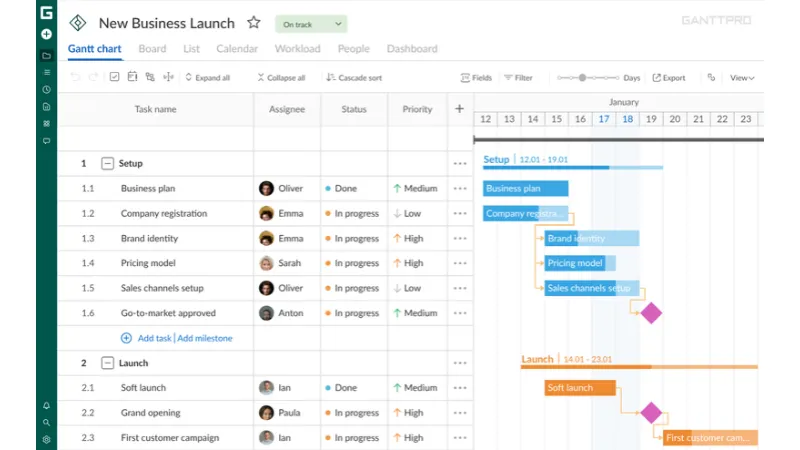
GanttPRO offers a powerful Gantt chart that is its core advantage. It’s a solid tool for task planning, project management, and team collaboration. This software can also help you track time, create dependencies, add deadlines, and mark core milestones.
The platform helps you orchestrate resources and manage workloads. It facilitates strong communication capabilities within project teams and with external stakeholders.
This Microsoft Project alternative supports import and export of project plans. For tighter control, a Baseline feature is available to compare initial expectations with the actual progress of a project.
Apart from the diagram, GanttPRO provides other views of project planning: Board, List, Calendar, and Dashboard. Prebuilt templates will have you up and running fast.
You can also enjoy smart AI tools here, such as the AI Project Planner and the AI Gantt chart maker.
It also offers a free mpp. viewer for you to open MS Project files with ease.
2. TaskFord
This is another solution that looks like an alternative to the familiar product from Microsoft.
TaskFord combines project management, resource planning, and the coordination of team communication.
Its users can work with simple Gantt charts or intuitive Kanban boards. Each team member can choose the task visualization that suits them best. The resource allocation feature helps to see who is available and what the current workload is.
The service makes it easy for you to track billable and non-billable hours. It allows for managing invoices and tracking budgets. This is especially great for agencies and studios. It also integrates fully with Google Calendar and Outlook.
3. Baserow
Baserow is a smart alternative to many traditional project planning solutions such as MS Project.
Startups rely on it because it helps them build databases and automate work. The tool has an intuitive interface based on spreadsheets. It comes with drag-and-drop to organize processes without a headache.
The software also provides smart AI features. They reduce manual work and help to turn ideas into plans in few minutes.
Users get robust collaboration tools that keep everyone in a team aligned. They can leave comments, attach files, and get notifications there.
4. Zoye
Startups and small businesses choose Zoye because it offers a simple yet feature-rich, unified workspace for their entire operations.
You can work with a task planner, a CRM system, as well as calendars, documents, finances, and automated reports — all in one place. The platform’s built-in AI assistant helps keep things organized, minimizing both errors and downtime.
This is a viable option for small teams that cannot afford to pay for several niche software solutions.
Zoye also includes a task module that allows you to track projects, allocate team members, and receive status updates in real time.
It’s also possible to manage expenses here. You can track project costs and see what work actually makes money.
5. ProjectLibre
ProjectLibre is a powerful program that allows for opening Microsoft Project files. It makes it possible to migrate existing plans without complex, time-consuming preparation.
It is very popular with young professionals and teams due to its cost-effectiveness. It has a free plan with all the basic features, so you don’t need to switch to another software.
ProjectLibre provides you with useful resource histograms, easy-to-use network diagrams, and a work breakdown structure (WBS).
This Microsoft Project alternative supports the traditional Waterfall methodology and provides flexible options for configuring task dependencies. It also features full support for working with Gantt charts.
6. OpenProject
OpenProject can be used for both Agile and Waterfall project management, which is why it is one of the best alternatives to MS Project.
It's great for businesses that have to balance tight deadlines with short, iterative cycles.
The tool is designed for managers and their teams to work together on a wide range of projects. With its features, teams can work more productively, create realistic plans and roadmaps, coordinate tasks, and deliver quality outcomes.
Shared access to plans and roadmaps provides visibility into the process at all levels. Here you can keep track of tasks, know exactly who is working on what task, monitor deadlines, and so forth.
7. Plane
Project managers choose Plane for its simple and uncluttered feature set. It’s a favorite choice for small product teams, marketers, and developers. This system is often considered a substitute for complex solutions like MS Project or Jira.
At its core, Plane is a handy task tracker. However, it offers enough functionality to support project management based on both Agile and Waterfall methodologies.
This PM software offers simple lists, boards, Gantt charts, and calendars, all available on every plan, including the free tier. It also has built-in features for documentation handling.
Time tracking is available only on paid plans, though.
8. Taiga
Another PM software with a lot of features is Taiga. It is well suited for modern startups.
This is a free open-source tool designed for professionals who follow the Agile methodology. Therefore, it's a popular choice among developers, designers, and project managers.
Taiga supports Kanban and Scrum. It has a product backlog board where tasks are arranged by the order of execution. You can easily assign tasks to certain sprints.
In Taiga, a handy board separates the different stages of the project into individual cards that can be moved to other stages depending on the progress of the work.
This tool can also import projects from other systems.
Let your startup team work with software that outperforms Microsoft Project
Microsoft Project isn’t the right fit for everyone. Modern startups tend to look for software that is lean, efficient, and cost-effective. They need core functionality, along with occasional access to advanced features, such as portfolio management, resource allocation, or complex reporting.
PM programs are only really useful if your team uses them without needing a poke.
After all, it’s not about the features. It’s about whether your people will actively update their project statuses on a typical workday.
A platform alone can’t create order when no one is responsible for decision-making. Choose a reliable Microsoft Project alternative and get your startup on track to achieve its core business goals.
Recommended Stories for You

Team SR Jul 6, 2026




Team SR Jan 16, 2026
Sophie Carter Sep 29, 2026
Trending Stories

World of Warcraft: Mists of Pandaria Classic – Terrace of Endless Spring Raid Guide

How British Fintech Talent Built the Smoothest Payment System in Live Entertainment

How GoreAd Supports YouTube Visibility Without Asking for Account Access

How to Launch a Startup in Luxembourg: A Modern Entrepreneur’s Guide

The Small Business Owner’s Guide to Protecting Personal Finances

Soft2Bet Behavioral Analytics and Early Risk Detection

Best Crypto Exchanges in Turkey: The Definitive 2026 Guide

Real Estate Investment Opportunities UK Detailed 2026 Guide