

A group chat of three people where you share updates about the project and everyone is on the same page is probably the easiest time you are going to have as a business. Of course, this isn’t sustainable. You cannot screen through your tasks on WhatsApp when there are 20 employees with their own set of requirements and workflows.
 Follow us
 Follow us
That being said, obviously growth is never a problem for startups; in fact, that is precisely what they are working towards. The problem starts when your tools can’t keep up anymore. You have to choose the right tools for your employees so they can communicate effectively with each other, saving you the hassle of collecting updates from multiple people for two hours.
Why the Tool That Works for 5 People Breaks at 30
Imagine you and two friends are going to have a movie marathon; it is going to be infinitely easier to decide on a day when you all are free. Extrapolate the same scenario where you have to organize a party for 50 people, and they all have their own dietary restrictions and time constraints.
A project management tool gives this haphazard model a structure that is easy to read and update.
RECOMMENDED FOR YOU


Using Data Analytics to Improve Inventory Management for Nicotine Alternatives
Team SR
Aug 27, 2026

Integrated Solar Panels That Don’t Sit On Top Of Your Roof Like An Afterthought
Team SR
Dec 17, 2025
Tasks become interconnected: As a project goes through its stages, you can visualize how your teams perform. For example, the development process cannot start if the designs aren’t approved.
Founders need a broader view: As a founder, you don't have enough information if you have to look at a list of tasks that need to be completed. It is much more convenient to check the entire project status at a glance on a timeline.
New hires need clear processes: A new hire in your office should not have to run around to get updates or ask seniors about the progress of a project to pace themselves.
External stakeholders expect predictability: Your clients and investors are always going to notice if you are providing concrete timelines and regular progress updates; even more so when they can simply log into the software solution and see for themselves how it’s going.
Start With a Plan, Not a Tool
The first thing you need to do before committing to a software solution and paying the subscription fees is to make a to-do list.
This serves as an overview of what the organization needs to do to deliver a successful product. The safest way to start familiarizing yourself with a tool is to take advantage of a free trial or a ready-made template—for example, try out a free Gantt chart template here, and see how it affects your workflow.
The Best Project Management Tools for Each Growth Stage
Early Stage (2–5 People)
The tool you use at this stage should be easy to implement and make daily life easier. Teams this size do not need administration that serves no purpose other than bookkeeping.
Quire
Quire is a platform where you can combine nested task lists with Kanban boards. The solution lets teams organize their tasks in a hierarchical structure, i.e., breaking down the task into smaller goals. You have access to assign stages to tasks, like To Do, Done, or In Progress.
The free plan gives you basic task management and Kanban features. A small team can get good benefits from Quire, but you may need more advanced scheduling and resource management features if your team has to manage multiple complex projects.
Kanban Tool
Kanban Tool offers a unique platform where your tasks appear as cards in columns on your computer screen. Users can move tasks, that is, the “card” associated with the job, to different stages of progress. The interface is easy to understand, and implementation doesn’t take a whole week of training.
The free plan allows users to have two users and two customizable boards. The enterprise plan lets you access more widely used features like time tracking and reporting.
Growing Team (5–20 People)
Keeping track of individual tasks is not sustainable once your team exceeds 5-6 people. You have to monitor different teams now doing the same work. The right solution will help everyone on your team to have a shared view of the progress.
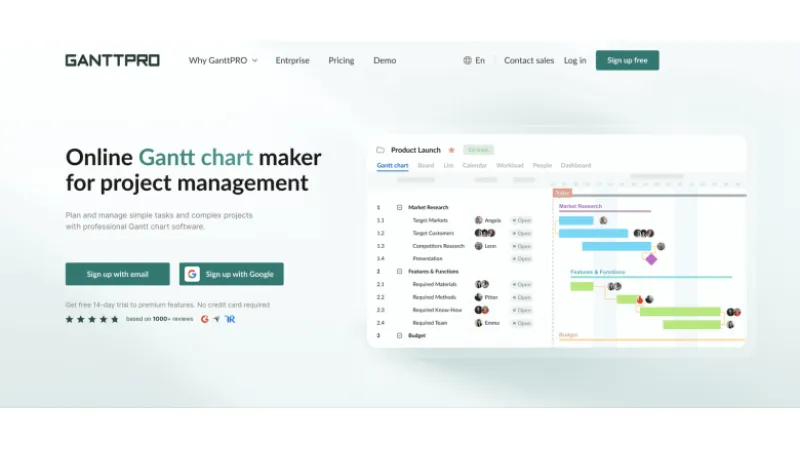
GanttPRO
This platform is built around Gantt charts. This means you organize your projects and tasks along a visual timeline. You get to set the milestones and determine the critical path for your project.
The Core Plan allows you to choose from ready-made project templates and share the information with external stakeholders. You can also plan where your resources are going to be needed. Saving your own templates is available from the Advanced plan, while workload management and other heavy-duty features are accessible once you subscribe to their Business and Enterprise plans.
Freedcamp
Freedcamp brings together calendar appointments, tasks, milestones, and reporting under one software solution. The most noticeable improvement it brings is that members do not have to switch between applications to assign duties, set deadlines, or discuss how the project is going.
Freedcamp offers unlimited users and projects with their free plan, subject to fair usage limits. You may need to explore their paid features if your projects are extremely specialized.
Scaling Company (20–50+ People)
At this stage, you generally have to manage different teams who are working on multiple projects at the same time. You need to make sure, as an entrepreneur, that your team has access to reliable reporting systems and a consistent, clear workflow, while you have to manage the budget and time constraints effectively.
Breeze
Breeze lets you combine budgeting for your projects, reporting, and time tracking with your task boards, so your employees can start their timer directly from their “My Tasks” screen instead of doing it manually through extensions like Toggl and so on.
The platform has an hourly rate feature for agencies that usually deal with client work. But if your company deals with complex approval processes or extensive portfolio reporting requirements, you may need a more specialized solution.
Zenkit
Zenkit offers its users the freedom to choose how they want their workflow to be displayed. You can choose from Kanban boards, lists, table formats, and even mind map views for the same project.
Noticeable features include multi-level subtasks and automation features. The paid plans offer more administration and collaboration capabilities for managers.
5 Signs It's Time to Switch Tools
There will be subtle signs that your business needs a little more control. It usually goes like this:
- Status updates and meetings take up most of the work week
- You miss deadlines and don’t know which department was responsible for the delay
- Some employees have a lot of free time while others are drowning in paperwork
- You have to juggle multiple applications to get a report about a project
- A lot of time is spent training new hires, and they still have to run around the office for updates
How to Switch Without Losing Momentum
If your team has already familiarized themselves with a software, changing to a new one suddenly won’t be efficient.
- Choose one pilot project: Let your employees try out the new platform with a single active project before switching.
- Move active work first: Transfer the projects going on currently first before getting on to completed jobs.
- Assign one migration owner: Assign someone familiar with both tools to handle the migration, answer any questions employees might have, and coordinate the transition.
- Review after 2-3 weeks: Collect feedback from your team to see what’s working and what’s not; if any deadlines have been missed, if communication has improved between departments, and so on.
Conclusion
It is quite evident that there is no single all-in-one tool that you can subscribe to for years. You have to choose the right one according to your current situation. The requirements of a small team are very different from those of a scaling company.
The correct option will meet your current needs while leaving headroom to support the eventual growth over the next few years.
Recommended Stories for You

Team SR Feb 11, 2026

Team SR Apr 13, 2026

Team SR Sep 24, 2026

Team SR Jun 16, 2026

The Best Booking Software for Small Business Owners Who Want to Stop Managing Schedules Manually
Sophie Carter Oct 9, 2026
Trending Stories

How to Budget for Self-Education Without Overspending

World of Warcraft: Mists of Pandaria Classic – Terrace of Endless Spring Raid Guide
Before the First Photoshoot: What Startups Should Prototype and What They Must Prove

How Trade Shows Inspire New Laser Technology and Applications

Top 8 Recommended AI SEO Agencies In St Albans For Your Growing Business

The Operational Economics of Appointment Setting in High-Volume Sales Organizations

How to Launch a Startup in Luxembourg: A Modern Entrepreneur’s Guide

How British Fintech Talent Built the Smoothest Payment System in Live Entertainment