


If you are a ConTech startup, a single office plan is rarely going to work for you. Small teams need to run pilots on active sites, and coordination with contractors and suppliers is a must. And if you are developing your own software at the same time, the effort just doubles. There are so many variables, like inspections, site access, and many more that you need to consider. Plus, these lead to delays.
 Follow us
 Follow us
Keep projects on track with the right scheduling system. Map dependencies, assign tasks, and communicate updates almost instantly from a unified platform. It is the best way to keep projects and the roadmap moving without needing a large project management office (startups can’t afford it anyway).
Does your ConTech startup really need construction scheduling software?
Construction projects can turn into a nightmare really quickly if you can’t handle them right. It’s the easiest way to expose a young company to delivery pressures from the moment you take on a contract. Like all humans, you need a strict schedule/routine to help you get through the mess. It helps manage some very practical demands:
- Client visibility: Owners expect to see a real structure based on agreed milestones. Set up target dates and progress updates they can review.
- Multi-party coordination: Contractors, subcontractors, suppliers, and site managers control tasks that depend on one another. These are task dependencies. Teams can mark a job complete in the scheduling software for everyone on the project to see, and the next phase begins immediately if the order is already set up; no need for additional emails and clutter. Consequently, it is also very easy to determine when one team falls behind and disrupts the workflow.
- Limited internal capacity: There is very little room for overlooked site tasks or missed approvals. A change in one activity almost always prompts a review of its dependent task.
- Fast adoption in the field: Site users get a simple way to report progress and defects right from a phone or tablet.
If you are delivering services and products on job sites, scheduling is not an optional task. Construction scheduling software is core to delivery; click here for the overview of some of the best options for you out there.
RECOMMENDED FOR YOU


Why BYDFi Is the Best Coinbase Alternative for Perpetual Contract Trading
Team SR
Oct 21, 2025
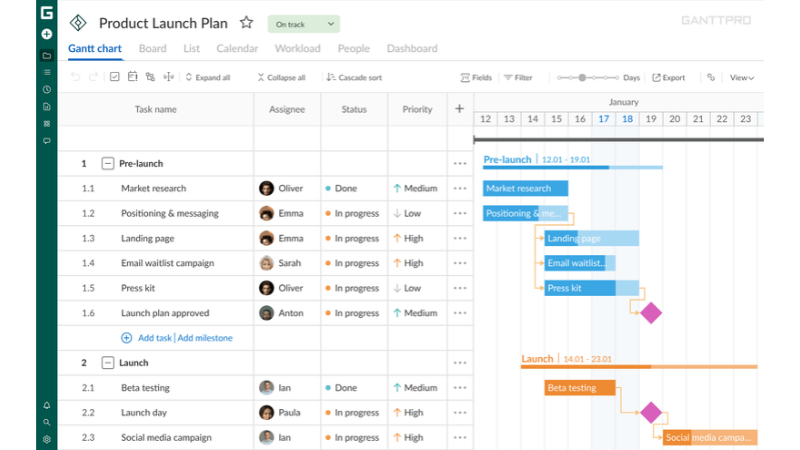
The platforms we got here are very different when you compare the scale and the technical depth side by side. Pick one based on the level of control you and your clients need.
1. GanttPRO
Based on the bar chart method designed by Henry Gantt, this platform allows you and your team to plan projects visually. Effortlessly work and track deadlines with no enterprise deployment hassles.
Features we loved
- Task dependencies with lead and lag settings. Automatic schedule recalculation for any alteration in linked tasks.
- Milestones, project calendars and baselines to compare the approved plan with current dates.
- Workload views and resource assignments to spot over-allocation across your projects.
- A Gantt chart might be the easiest way you can explain progress and status to external stakeholders. Good structured scheduling is what it does best.
GanttPRO is still a general project management tool at heart. Because of this, you miss out on some of the more specialist workflows that pro users need, but if you just need a visual planning tool, GanttPRO is going to be an excellent all-rounder for your ConTech team.
2. Kahua
Kahua is a configurable construction project management platform. You can connect construction records with project controls using this platform. Kahua is great for when a pilot has one too many documents to trace, or when multiple organizations need to collaborate on one project.
Features we loved
- You can integrate MS Project and Primavera P6 schedules into Kahua for Gantt-based visibility and progress tracking.
- In case the scope of your project changes, you can change the management workflows right on the platform.
- Document management for drawings, RFIs, submittals, approvals, and shared project records.
- Configurable forms, permissions, workflows, dashboards, and mobile access. Users also have features like offline work and later syncing.
Thanks to super-configurable workflows, Kahua remains a top choice for already-established project-control environments. But the same configurable workflows will need more implementation and administration. Overwhelming for smaller teams.
3. Bentley SYNCHRO
Bentley SYNCHRO focuses on 4D construction planning and connects construction schedules with 3D BIM models, meaning your team can carry out and examine 3D construction sequences based on their plans.
Features we loved
- You have the freedom to create your own schedules with the critical path method; or you can connect premade schedules from Primavera P6 and Asta Powerproject.
- You can link scheduled activities to model components and assign labor and materials on the platform.
- There is a feature to simulate construction sequences and test alternative scenarios.
- Compare baseline and actual schedules. Update progress and analyze resource use and cost.
SYNCHRO fits if you are testing a BIM-led product for infrastructure or construction sequencing. But to get the best out of it, teams need usable model data and scheduling expertise. And let’s not forget all the hardware you need to get real value from its 4D workflows.
4. Causeway
Causeway is a platform that helps field activity personnel collect data and communicate effectively with office members. The CausewayOne platform has mobile tools that capture site information and relay progress to stakeholders.
Features we loved
- Job sheets to plan and schedule field work for on-site personnel to follow.
- Log important events like weather, activities, and more with site diaries.
- The platform is very document-heavy, so snagging (defect reporting) plays an important role; therefore, it comes with a digital checklist. You can also record issues with descriptions and images.
- Time and attendance tools to capture workforce hours and labor data. Supports both mobile and biometric options.
Causeway is meant for pilots that depend on labor records and proof of completed work. In other words, operational data capture capabilities. Confirm that the selected module also covers master scheduling and cross-project planning if you are planning to use Causeway.
5. Housecall Pro
Housecall Pro is a field service platform geared more toward home service contractors that need to schedule the same technicians for multiple clients. It’s your one tool to manage booking, dispatch, estimates, invoices, and payment collection.
Features we loved
- Calendar-based scheduling for new and recurring jobs. Easy technician assignment and dispatch notifications.
- Online booking and customer portal for easy appointments and service estimates.
- Digital invoicing, payment processing, reminders, and integrations with accounting tools.
- You can create a custom estimate for any job and share the same with the client for approval.
Housecall Pro is a better pick for recurring maintenance work or repair contracts. Here, technician routing and customer appointments matter way more than basic scheduling.
Picking the right tool
We found 5 of the best ones out there, but this does not mean every single tool will fit in with your workflow perfectly. Understand your requirements before proceeding. Here are a few tips:
- Team size and budget constraints: If you need to hire new members, evaluate subscription costs and also take into account the money that would be spent on training, implementation, and so on.
- External collaboration: Ask your clients and contractors if the platform is easily accessible to them, or if they find communicating with other members is faster on one platform than another.
- Mobile functionality: Test the platform on the actual site devices to understand how the software will perform in real-world situations.
- Trial availability: You can always check out a platform if it has a free trial available to determine if it would be a good fit for you. But keep in mind that some features might be locked, and the full experience of the platform might be only accessible to you if you are using the premium version.
Here’s a useful tip: test out two or three platforms on the same live pilot. Create an identical project schedule in each system and compare features that you need.
Closing thoughts
A ConTech startup starts by handling pilots for real construction jobs. As talked about in the beginning, managing multiple people, i.e., contractors, clients, labor workers, handymen, electricians, and the guy you don’t even know what his job is, is an extremely taxing job, especially when you do it 5 days a week; sometimes even more when you have to manage delays and call people on Sundays.
Reliability is what makes you stand out amongst the plethora of startups. Scheduling so many variable factors to be on time, so you deliver the pilot without any delay, is almost impossible without a visual tool. You can always take a look at some of the best options with the link in the post.
Recommended Stories for You

Team SR Jul 24, 2026

Team SR Mar 12, 2026

Team SR Jan 23, 2026


Team SR Mar 9, 2026

Trending Stories

How Startups Can Get Recommended by ChatGPT in 2026

World of Warcraft: Mists of Pandaria Classic – Terrace of Endless Spring Raid Guide

How to Launch a Startup in Luxembourg: A Modern Entrepreneur’s Guide
Before the First Photoshoot: What Startups Should Prototype and What They Must Prove

How Trade Shows Inspire New Laser Technology and Applications

The Operational Economics of Appointment Setting in High-Volume Sales Organizations

Top 8 Recommended AI SEO Agencies In St Albans For Your Growing Business

How to Budget for Self-Education Without Overspending