

The Three-Second Audio Problem: Why Short Videos Feel Wrong Before You Know Why
Oct 13, 2026 | By Sophie Carter
 Follow us
 Follow us
A creator spends an evening cutting a thirty-second video. The captions are neat, the lighting looks good, and the final joke lands exactly where it should. Yet the opening feels strangely flat. The trouble might not be the picture. Music begins too late, the beat fights the spoken hook, or the track sounds unrelated to the scene. You can use AI Song to create music candidates from text descriptions, but no generator can decide whether audio and editing actually belong together. That part requires a few practical listening tests.
Watch the Opening With Your Eyes Closed
Many editors treat music as a final layer. They finish every cut, drop in a track, and assume the job is done. Short videos make this especially risky because the opening carries so much responsibility. Within a few seconds, viewers are trying to work out what they are watching and whether it interests them.
Close your eyes and play the first three seconds. What arrives first: a voice, a sudden beat, a burst of silence, or an abrupt sound effect? Does the audio suggest the same feeling as the picture? A calm tutorial with an aggressive dance introduction creates conflicting signals. A funny reveal with a slow, melancholy opening may drain its energy.
Now mute the music and replay the hook. If the spoken words become immediately clearer, the soundtrack may be competing with the story. Changing the music is often easier than rebuilding the entire edit.
Make a Sound Brief for a Real Scene
Suppose you are editing a 25-second reel about restoring a scratched second-hand chair. The first five seconds show the damage, the middle shows sanding and painting, and the final shot reveals the result. The music should support the change without pretending that an ordinary furniture repair is an action movie.
Describe that project in plain language: “Light rhythmic instrumental, playful but not childish, steady tempo, suitable for quick DIY cuts, no vocals.” An AI Music Generator can use a written description to create a musical candidate; the website also offers an instrumental setting. Listen to what it produces before placing anything on the timeline.
If the track is too busy, simplify the request. If it feels sleepy, try a stronger pulse rather than piling on adjectives. Do not expect the service to identify the chair reveal, arrange your edit, or automatically place musical changes at the right frames. Those are separate editing decisions.
RECOMMENDED FOR YOU


Chaturbate Dowloader: How to Record Chaturbate Streams Safely and Reliably
Team SR
Aug 18, 2026

Diagnose the Problem Before Replacing the Track
Not every awkward video needs a new song. Some need better placement, a lower volume, or a pause. Use a few precise checks before browsing more music.
1. The soundtrack enters before the point is clear
An opening voice might say, “Here's why my morning routine never works.” A loud musical introduction arriving on the first word can make that sentence harder to catch. Try bringing the music in after the hook, or starting it quietly beneath the speaker. Keep the words audible on ordinary phone speakers.
2. The beat fights the visual rhythm
A series of quick outfit changes may feel lively with a regular pulse. The same pulse might hurry a slow cooking demonstration. Watch the main cuts and note whether they consistently land just before or after musical accents. You do not need every cut on the beat, but an accidental clash can make the sequence feel unsettled.
3. A vocal track competes with dialogue
Lyrics and narration both ask viewers to process words. Sometimes that clash is intentional, but often it simply sounds busy. Try an instrumental alternative when a person is explaining steps or telling a story. It gives the voice room without making the entire video silent.
4. The ending has nowhere to go
The picture ends, but the music seems to be in the middle of a phrase. A hard cut can work for a joke or a surprise. For an informative clip, a short fade or more deliberate endpoint may feel better. Check the final second at normal listening volume rather than relying on the editing timeline alone.
Do the Phone-Speaker Test
A soundtrack that feels rich through studio headphones can sound thin or harsh on a phone. Test the video at a comfortable volume through an everyday device. You are checking intelligibility, not trying to achieve the loudest possible result.
Use three quick passes. First, listen to the spoken lines and confirm that every important word is clear. Second, focus on transitions: are there accidental jumps in volume or awkward gaps? Third, watch without audio. Captions and images should still explain what happens, particularly for people viewing in a quiet public place.
Avoid using numbers or volume targets copied from another creator's project as universal rules. Voice recordings, music styles, platforms, and devices differ. Use your ears, and seek proper audio guidance when preparing professional broadcast work. If you edit on a laptop, check whether its speakers are hiding bass or exaggerating high notes. A cheap phone can expose problems you missed in headphones, especially with soft voices and sharp percussion.
Choose Sound Based on the Kind of Short Video
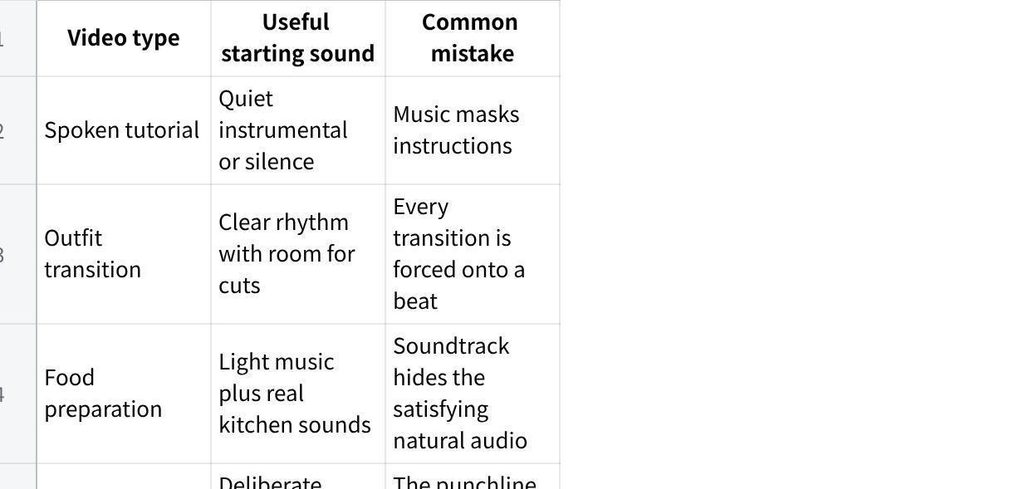
点击图片可查看完整电子表格
Notice that the answer is not always more music. A knife meeting a chopping board, a door opening, or someone laughing may be the strongest sound in the clip. Leave these moments audible when they serve the story.
There is another practical consideration before publishing: usage rights. Check the relevant music terms and platform policies, especially for brand partnerships or advertising. A statement that music is royalty-free does not remove the need to understand the conditions for a particular use. Keep track of which audio belongs to each posted video.
Build a Repeatable Review Habit
The simplest workflow is not a complicated checklist. Before exporting, replay the first three seconds, one dialogue-heavy section, and the final second. Listen once with headphones and once through a phone. Ask a friend to tell you what the clip is about without explaining it first.
If that friend misses an important line, address the mix or timing before changing visual effects. If the ending feels unfinished, move the audio endpoint. If the opening sounds generic, compare one quieter or more distinctive track. A few focused changes usually teach you more than auditioning an endless stream of unrelated songs. Save a short note about what worked. The next time you edit a tutorial or a joke, you can begin with a tested approach instead of repeating the same audio mistakes.
Conclusion
When a short video feels wrong, the problem may be the relationship between its sounds rather than the music itself. Listen to the hook, protect spoken words, examine transitions, and let a strong natural sound remain when it helps the scene. Generated tracks can provide choices, but the creator still controls timing, volume, and the final judgment. The goal is not to fill every second with audio. On your next edit, close your eyes for the opening three seconds and fix the first sound that distracts you.
Recommended Stories for You

Kailee Rainse Feb 5, 2026

Team SR Oct 26, 2024


Sophie Carter Sep 30, 2026

Team SR Jul 9, 2026

Trending Stories

When Social Media Doesn’t Work: Multi-channel Marketing for B2B

What to Ask Before Hiring a Lawyer for a Family Estate Dispute

Building a Trustworthy Sender Reputation From Day One
The Best Booking Software for Small Business Owners Who Want to Stop Managing Schedules Manually

Buying a Second Hand Car as a Company Vehicle for a Start-Up: Is It a Good Idea

How Startups Can Scale Customer Support Without Growing Their Team

World of Warcraft: Mists of Pandaria Classic – Terrace of Endless Spring Raid Guide

Funding the Future of Home Technology & Design