

Sage Cloud Accounting: Features, Benefits, and How It Helps Small Businesses
Oct 26, 2026 | By Olivia James
 Follow us
 Follow us
Managing business finances is easier when you have the right accounting software. From creating invoices to tracking expenses and checking cash flow, accounting tools help businesses keep their financial records organised. Sage Cloud Accounting is one such solution that helps freelancers, small businesses, and growing companies manage their daily accounting tasks.
With online access, bookkeeping tools, and financial reports, Sage helps business owners save time and understand their financial position. But what is Sage Cloud Accounting, what features does it offer, and is it the right choice for your business?
What Is Sage Cloud Accounting?
Sage Cloud Accounting is an online accounting solution that helps businesses manage their finances from internet-connected devices. Users can create invoices, record expenses, track customer payments, check bank transactions, and view financial reports in one place.
Sage offers different accounting products for businesses of different sizes. Sage Accounting is mainly designed for small businesses, while Sage 50 Cloud and Sage Intacct offer tools for more advanced accounting and financial management.
Unlike traditional bookkeeping, cloud accounting allows users to access financial records online. Business owners and accountants can review information without sharing spreadsheets or handling piles of paperwork.
For businesses looking to simplify bookkeeping and manage their money more efficiently, Sage Cloud Accounting can be a useful option.
Key Features of Sage Cloud Accounting
Sage offers several features that help businesses manage their accounts and keep track of their finances.
1. Online Invoicing and Payment Tracking
Businesses can create professional invoices and send them directly to customers. They can also check which invoices have been paid and which payments are still outstanding.
Depending on the plan, users may also have access to online payment options and payment reminders.
Why it matters: Sending invoices on time and following up on unpaid bills can help businesses receive payments faster.
2. Expense Tracking and Bookkeeping
Sage helps businesses record expenses and organise their financial transactions. Some plans also include tools for capturing receipts and managing purchase invoices.
By keeping income and expenses in one place, business owners can understand where their money goes and prepare their financial records more easily.
3. Bank Reconciliation
Bank reconciliation means comparing business accounting records with bank transactions to check that the figures match.
Sage supports bank feeds and transaction matching in eligible markets. These tools can reduce manual work and help users identify missing transactions or errors.
However, available bank connections depend on the user's bank, country, and Sage subscription.
4. Cash Flow Management
Cash flow is important for every business. Companies need enough money to pay employees, suppliers, rent, and other expenses.
Sage helps users review their income and spending. Some plans also offer cash flow forecasting, which helps businesses estimate future income and expenses.
This information can help business owners plan payments and avoid unexpected cash shortages.
5. Financial Reports
Sage provides reports that help businesses understand their financial performance. Depending on the product, users can view profit and loss statements, balance sheets, and cash flow reports.
These reports help business owners check whether their company is making a profit, control spending, and plan future expenses.
6. Tax and Compliance Tools
Sage includes tax-related features for supported markets. For example, some regional versions offer tools for managing Value Added Tax (VAT).
These features help businesses organise transactions and prepare financial information for tax reporting. However, users should check whether their chosen plan meets their country's tax and filing requirements.
7. Mobile and Remote Access
Cloud accounting allows users to access selected financial information without being in the office. Supported mobile features make it easier to manage accounting tasks while travelling or meeting clients.
This can be especially helpful for freelancers, consultants, and small business owners who need access to their records throughout the day.
Benefits of Using Sage Cloud Accounting
Sage Cloud Accounting offers several benefits for businesses that want to improve their accounting processes.
- Saves time: Accounting tools reduce the need for manual data entry and repetitive tasks.
- Keeps records organised: Businesses can manage invoices, expenses, and transactions in one place.
- Improves cash flow management: Payment tracking helps users follow up on unpaid invoices and plan expenses.
- Reduces manual errors: Bank feeds and transaction matching can help minimise mistakes.
- Makes teamwork easier: Business owners can share access with accountants and authorised team members.
- Supports business growth: Different products offer features for changing business needs.
- Helps with financial planning: Reports give business owners a clearer picture of their income and spending.
The results depend on how regularly businesses update their records and whether the selected plan meets their needs.
Sage Cloud Accounting Plans and Their Differences
Sage offers different accounting products and subscription options. Their names, prices, and features may vary by country.
| Plan or product | Best suited for | Main features |
| Sage Accounting Start | Freelancers and sole traders | Basic accounting, invoicing, and payment tracking |
| Sage Accounting Standard | Small and growing businesses | Bookkeeping, purchase invoices, and financial reports |
| Sage Accounting Plus | Businesses with additional needs | Selected inventory, budgeting, and multi-currency tools |
| Sage 50 Cloud | Businesses needing advanced accounting | Inventory management, job costing, and detailed reports |
| Sage Intacct | Larger and growing organisations | Advanced financial management, budgeting, and reporting |
This table provides a general overview. The actual features available depend on the product version and regional subscription.
Who Should Use Sage Cloud Accounting?
Sage Cloud Accounting can be useful for businesses that want to move away from spreadsheets and manual bookkeeping.
Freelancers and consultants: They can create invoices, track client payments, and record business expenses.
Small businesses: Shops, agencies, and service providers can manage daily transactions and review their financial performance.
Growing companies: Businesses with more customers and suppliers may benefit from additional reporting and cash flow tools.
Accountants and bookkeepers: They can access authorised financial records and help clients manage their accounts.
Businesses working with international customers: Some plans support multiple currencies, making them useful for businesses that deal with customers in different countries.
However, Sage may not be the best choice for businesses looking for completely free accounting software or specialised features that are not included in their selected plan.
Read Also- Top 10 AI Business Sectors in Germany (2026)
Is Sage Cloud Accounting Easy to Use?
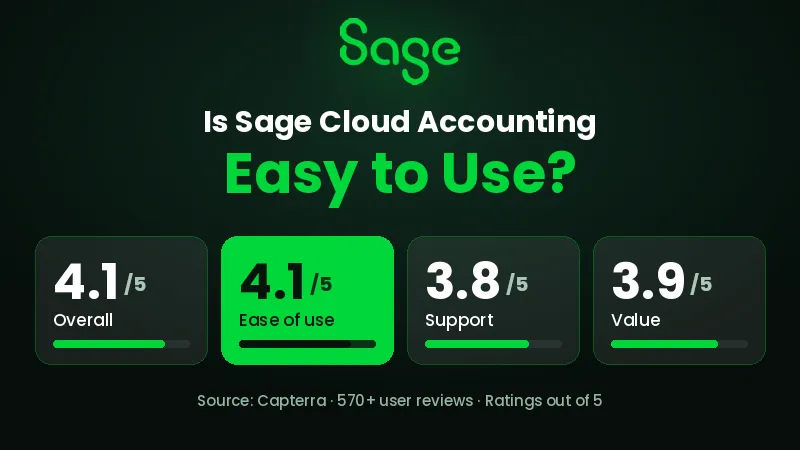
Sage is designed to make daily accounting tasks easier. Its online platform allows users to manage invoices, check transactions, and view financial reports in one place.
However, beginners may need some time to learn how to use its features. Tasks such as bank reconciliation, tax settings, and financial reporting may take practice. Businesses with more complex accounts may also need help from an accountant.
Before buying a subscription, you can check whether Sage offers a free trial or product demonstration in your region.
Sage Cloud Accounting Pricing
The cost of Sage Cloud Accounting depends on the plan, country, and billing option. Entry-level plans usually cover basic accounting and invoicing, while higher plans may include more users, advanced reports, inventory tools, and multi-currency support.
Before choosing a plan, consider these points:
- Monthly and yearly subscription costs.
- The number of users included.
- Available bank connections and payment options.
- Tax features for your country.
- Customer support and training.
- Extra costs for integrations and additional features.
Sage Cloud Accounting: Advantages and Limitations
| Advantages | Limitations |
| Access financial records online | Requires an internet connection for cloud access |
| Makes invoicing and bookkeeping easier | Some features require higher-priced plans |
| Provides useful financial reports | Beginners may need time to learn the software |
| Helps match bank transactions | Bank connections vary by country |
| Offers products for different business sizes | Prices and features vary by region |
| Makes it easier to work with accountants | Complex accounts may require professional help |
RECOMMENDED FOR YOU


How to Choose the Right Sage Accounting Plan
Choosing the right plan depends on your business needs and budget. Here are some points to consider before making a decision.
- Understand your needs: Decide whether you need basic invoicing or more advanced accounting tools.
- Check your workload: If your business handles many invoices and expenses, look for features that save time.
- Review tax requirements: Make sure the software supports the tax rules in your country.
- Plan for growth: Choose a plan that can support your business as it grows.
- Compare costs: Check the subscription price and any extra charges for users or integrations.
- Try the software: Explore its features before moving all your financial records to the platform.
Final Thoughts
Sage Cloud Accounting helps businesses manage invoices, expenses, payments, and financial reports in one place. Its online tools can reduce manual work and make it easier to understand where money comes from and where it goes.
Freelancers and small businesses may find a basic plan suitable for their daily accounting needs. Businesses with more complex requirements can explore products with advanced reporting, inventory management, and other financial tools.
Before choosing Sage, compare the available plans, check local tax requirements, and consider your budget. Testing the software first can help you decide whether it is the right accounting solution for your business.
FAQs
What is Sage Cloud Accounting used for?
Sage Cloud Accounting helps businesses manage invoices, expenses, payments, bank transactions, and financial reports. The available features depend on the product and subscription.
Is Sage Cloud Accounting good for small businesses?
Yes. Sage offers accounting tools for freelancers, sole traders, and small businesses. It can help them organise financial records, track payments, and understand their business performance.
Can I use Sage Cloud Accounting on my phone?
Yes. Sage provides mobile access and apps for supported products. The features available depend on the product and region.
Does Sage Cloud Accounting support bank reconciliation?
Yes. Supported versions allow users to connect bank accounts or import transactions to compare them with accounting records. Availability depends on the bank and country.
Is Sage Cloud Accounting free?
Sage mainly offers paid accounting plans. Free trials or special offers may be available in some regions. Check the official website for current options.
What is the difference between Sage Accounting and Sage 50 Cloud?
Sage Accounting focuses on everyday accounting tasks for small businesses. Sage 50 Cloud offers additional accounting features, such as inventory management and job costing in supported editions. The exact features depend on the version and country.
Recommended Stories for You

Team SR Aug 9, 2024

Kailee Rainse Dec 30, 2024

Team SR Sep 21, 2024

Team SR Nov 10, 2025

Oliver Bennett Dec 15, 2025

Team SR Jun 23, 2024
Trending Stories

Best Venture Capital Firms London 2024

The Top Disruptar brand, Revolutionizing the European
Startups Hit €200 Million+ in 2024 Funding Report
Business Credit Cards For Startups

Top Incubators And Accelerator Of UK

Startup Ecosystem Of Netherlands

Unique Business Ideas In Marseille For 2024
List of European Ecommerce Unicorn