

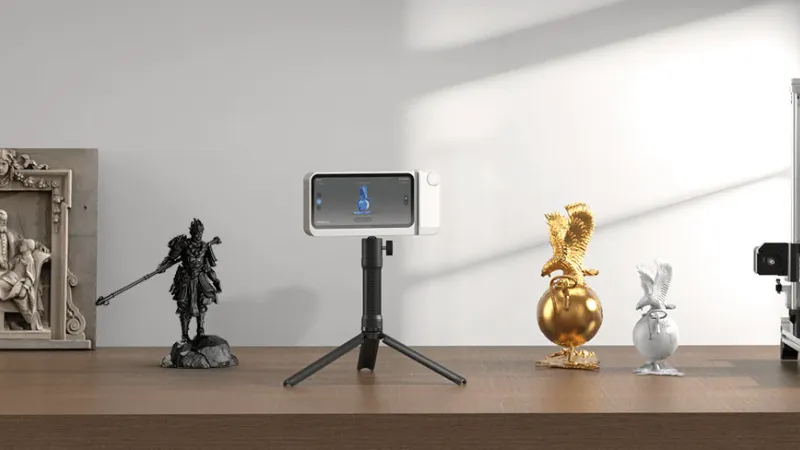
Choosing a 3D scanner can be difficult because impressive specifications do not always translate into easier scanning. Accuracy, object size, surface type, software, computer requirements, and portability all affect the final result. A scanner that performs well on a small mechanical part may be less suitable for capturing a person, vehicle panel, sculpture, or room.
 Follow us
 Follow us
A well-matched 3d scanner should support the intended objects and workflow rather than simply offering the highest advertised number. A useful comparison begins with the project, then examines scanning technology, tracking, software, and setup needs. This guide compares 3DMakerpro, Revopoint, Creality, and EINSTAR from that perspective.
Start With the Intended Scanning Task
The right scanner depends heavily on what must be captured. Small objects require fine detail and a short working distance. Medium objects benefit from stable handheld tracking. Large objects need a wider field of view and enough scanning speed to prevent long sessions.
Common applications include:
RECOMMENDED FOR YOU


How to Scale Your Twitch Channel Fast: Proven Growth Tactics for Streamers
Team SR
Aug 12, 2026

- Reproducing parts for repair or 3D printing
- Creating digital models of art, furniture, or products
- Capturing faces, bodies, or costumes
- Recording automotive panels and mechanical components
- Supporting reverse engineering or inspection work
Object size should be defined before comparing accuracy claims. A scanner designed for coins or small components may capture excellent detail but require too many passes for a large object. A wide-area device can work faster on a vehicle panel or person, although it may not reproduce very fine edges as effectively.
Surface type also matters. Dark, glossy, transparent, or reflective materials can be difficult for optical scanners because projected light may not return cleanly to the sensors. Scanning spray, markers, or controlled lighting may be required.
Understand the 3D Scanner Specifications That Matter
Accuracy and Resolution Are Different
Accuracy describes how closely a scan matches the real object. Resolution generally refers to the level of surface detail a scanner can reproduce. Point distance describes the spacing between captured data points, although manufacturers sometimes use these terms differently.
A scanner can create a dense-looking model without delivering the dimensional accuracy needed for inspection or part fitting. Manufacturer figures are often measured under controlled conditions. Real results depend on calibration, movement, lighting, object preparation, distance, and software processing.
Maximum accuracy should be treated as a best-case measurement rather than a guaranteed result.
Light Source and Tracking Method
Portable scanners commonly use structured light, infrared light, blue light, or laser lines. Infrared systems can work well for faces and larger objects. Blue structured-light, blue LED, and laser-line systems are commonly used for capturing fine geometry and sharper edges, depending on the scanner design.
Tracking may rely on natural features, adhesive markers, or a separate optical system. Feature tracking reduces preparation when objects have varied shapes. Smooth or repetitive surfaces may require markers to maintain alignment.
Scan Speed and Working Distance
A higher frame rate can make handheld scanning smoother, but speed alone does not guarantee a clean model. Stable tracking and consistent exposure remain essential.
Working distance is equally important. The operator must keep the scanner within its usable range while moving around the object. Large items benefit from a wider capture area, while small parts require closer control.
Comparing 3DMakerpro, Revopoint, Creality, and EINSTAR
| Brand | General Product Direction | Suitable Applications | Main Buying Check |
| 3DMakerpro | Portable systems for small, medium, and large object capture | Product design, art, hobby projects, and 3D printing | Match the scanner format to the intended object size |
| Revopoint | Compact, wireless, standalone, and optical-tracking systems | Portable scanning, color capture, reverse engineering, and varied object sizes | Review device, software, and processing requirements |
| Creality | Consumer-focused scanners using infrared and hybrid laser technology | 3D printing, mechanical parts, and mixed-size objects | Confirm which scanning modes are included |
| EINSTAR | Portable, wireless, and standalone systems for full-color scanning across small, medium, and large objects | People, parts, larger objects, and mobile scanning | Check model-specific scanning modes and system requirements |
The table describes broad product positioning rather than suggesting that every model performs the same way. Each manufacturer offers devices with different light sources, object ranges, and processing demands.
Revopoint covers compact structured-light devices, standalone scanners, blue-laser systems, and optical-tracking equipment. Creality’s CR-Scan Raptor combines blue laser and near-infrared modes, with a claimed accuracy of up to 0.02 mm in laser mode. EINSTAR systems include portable and wireless models with full-color capture.
For medium-format capture, the 3DMakerpro Moose is one practical option. Its specifications list blue LED scanning, claimed accuracy up to 0.03 mm, 24-bit color texture, and a weight of about 280 grams. This suits product prototypes, sculptures, and medium-sized parts.
Specifications should always be checked for the exact model being purchased.
Evaluate the Complete Scanning Workflow
Software Can Affect the Final Result
Scanning is only the first stage. Raw data often requires alignment, noise removal, hole filling, mesh repair, and export.
A capable scanner paired with difficult software can slow a project. Before purchasing, buyers should check:
- Supported operating systems
- Computer requirements
- Export formats such as STL, OBJ, or PLY
- Support for color textures
- Included editing tools
- Additional charges for advanced functions
STL is widely used for 3D printing. OBJ and PLY can retain visual data useful for digital models.
Reverse-engineering work may also require separate CAD software.
Accessories and Preparation Add to the Cost
The scanner price does not always represent the complete setup cost. A turntable can improve small-object capture. Markers may help with smooth surfaces. Scanning spray can support reflective or dark materials.
A mobile kit, tripod, or computer upgrade may also be necessary. The most useful price comparison examines the complete working package.
Use a Practical Buying Checklist
A structured process can narrow the choices:
- List the smallest and largest objects to be scanned
- Decide whether measurement or visual modeling is the priority
- Identify difficult materials
- Determine whether markers or spray are acceptable
- Check available hardware
- Review software compatibility
- Add accessories to the total budget
- Examine sample scans of similar objects
Sample results are most useful when they show raw data and processed meshes. Highly polished renders may hide errors.
Testing should also use a representative object.
Conclusion
Choosing the best 3D scanner begins with object size, required detail, surface conditions, and final use. Accuracy figures are useful, but they should be reviewed alongside tracking, working distance, software, and preparation needs.
A reliable decision comes from comparing models, studying realistic scan samples, and calculating the full setup cost. Buyers who define their projects first can avoid unnecessary features while still achieving the required results.
Recommended Stories for You


Team SR May 30, 2026

Team SR Mar 6, 2026
Sophie Carter Oct 6, 2026

Trending Stories

What Startups Should Think About Before Moving Into Their First Commercial Premises

My Honest RiseGuide Review 2026

The Filing Was Accepted. The Company’s Interstate Move Is Not Finished.

How to Check a Neighborhood’s Infrastructure Before You Buy or Rent

Conscious Breaks Boost Creativity and Well-being

Understanding Residential Proxy Networks and How They Protect Online Privacy

When Social Media Doesn’t Work: Multi-channel Marketing for B2B

Warning signs your workplace injury claim is heading for trouble