

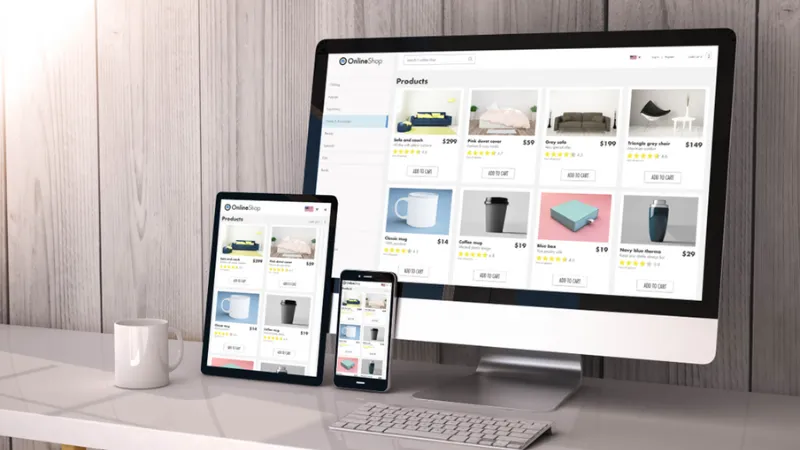
If you’ve ever wondered whether your product page needs more images or whether you’re just piling on extra pixels, you’re asking the right question. Product photography is one of the biggest conversion levers in ecommerce, but there’s a point where “more photos” stops helping and starts hurting. Too few images leaves shoppers uncertain. Too many can overwhelm, slow the page, and make the buying decision feel harder than it should.
 Follow us
 Follow us
So how many product photos do shoppers need before they buy?
The most useful answer is not a single magic number. It’s a range, plus a framework for choosing the right count based on what you sell, how complex it is, and what shoppers need to feel confident. The goal is to provide enough visual evidence to eliminate doubt, without creating clutter or cognitive overload.
Let’s unpack what “enough” looks like and how to build a product gallery that actually moves shoppers toward checkout.
RECOMMENDED FOR YOU



The Real Reason Shoppers Want More Photos
Shoppers don’t ask for more photos because they love scrolling through galleries. They want more photos because they’re trying to reduce risk.
They’re asking:
Is this the real product, or a polished idea of the product?
Will it look the same in person?
Is the size what I think it is?
What does it look like from the side or back?
What’s the material and texture?
How does it work?
What’s included?
Can I picture it in my life?
Each additional image should answer one of these questions. If your images don’t answer new questions, they’re not helping.
The Baseline Range That Works for Most Products
For many ecommerce products, a strong baseline is:
5 to 8 product photos per product page
That range usually gives you enough coverage to show the essentials without overwhelming the shopper. But it’s only a starting point. Some products convert well with 3 images. Others genuinely need 12 or more.
A better way to decide is to think in categories: simple products, moderate complexity, and high complexity.
Simple products: 3 to 5 images
Moderately complex products: 6 to 9 images
Complex or high-consideration products: 8 to 15 images
Complexity includes not only how the product works, but how many questions it naturally creates.
What Counts as a “Simple” Product
A product is simple when:
It has few features
It’s easy to understand at a glance
It has low risk of mismatch
Size and materials are obvious
The buyer doesn’t need much demonstration
Examples might include:
Basic accessories
Simple household items
Single-ingredient products
Straightforward consumables
For these products, shoppers may only need:
A clean hero image
A second angle
A detail close-up or packaging shot
An optional lifestyle shot
That’s 3 to 5 images, and it can convert well if the images are clear and consistent.
When Shoppers Need More Photos
Shoppers need more images when the product creates uncertainty. Uncertainty comes from:
Size ambiguity
Small items, large items, furniture, storage, bags, anything where “how big is it” is unclear.
Fit concerns
Apparel, shoes, wearable accessories, anything that sits on the body.
Material and texture sensitivity
Skincare, fabrics, jewelry finishes, handmade goods, anything where quality is judged by detail.
Function complexity
Tech products, tools, multi-step products, items with moving parts, anything where “how does it work” isn’t obvious.
Multiple variations
Colors, styles, bundles, sets, and options that need clarity.
High price or high consequence
The more expensive the product, the more proof shoppers want. The more annoying returns would be, the more reassurance they need.
If you see any of these, your product page probably benefits from 8 to 15 images, especially if you want to reduce returns and increase confidence.
The “Must-Have” Shots That Answer Buyer Questions
Instead of thinking “How many photos?” think “Which questions must I answer?”
A conversion-friendly gallery often includes these core image types:
- Hero image
Clean, clear, thumbnail-friendly. This is the click-maker. - Multiple angles
Front, 45-degree, side, back, top. Shoppers want to inspect. - Detail close-ups
Texture, stitching, ingredients, labels, controls, finishes. This signals quality. - Scale reference
In hand, on a model, next to common objects, in a room, beside a ruler. This reduces uncertainty and returns. - In-use / lifestyle image
Shows the product in a believable context. Helps shoppers imagine ownership. - What’s included
Bundles, accessories, packaging, contents. This prevents “I thought it included…” disappointment. - Feature explanation image or sequence
For complex products, show steps or key features visually.
That list can easily become 7 to 12 images, but notice the difference: each image has a job.
Why Too Many Photos Can Hurt Conversions
It sounds counterintuitive, but more images can sometimes reduce conversions.
Here’s why:
Decision fatigue
If shoppers see endless variations, similar angles, or repetitive images, they start feeling overwhelmed.
Scrolling fatigue
Excessive galleries can make product pages feel long and cluttered, especially on mobile.
Slower load speed
Large image files and too many images can slow pages, which increases bounce rates.
Signal confusion
If some images look inconsistent in lighting or color, shoppers wonder which one is true.
The fix isn’t fewer images. It’s fewer redundant images and better optimization. Your gallery should feel like a guided tour, not a scavenger hunt.
A Practical “Gallery Count” Framework
Here’s a simple way to decide your photo count quickly:
Start with 5 images:
Hero
Second angle
Detail close-up
Scale reference
Lifestyle/in-use
Then add one image for each of these factors:
Multiple color/variant options
Important back/side features
Complex setup or usage steps
Bundles or included items
Material quality needs proof
High price or high return risk
Most products end up with 6 to 12 images using this framework, but it stays purposeful.
What Shoppers Actually Want More Than “More Photos”
Shoppers want clarity and trust. A smaller set of high-quality images can outperform a larger set of inconsistent images.
Three upgrades that often beat “adding more photos”:
Better lighting and color accuracy
More variety in shot types (angles, detail, scale, in-use)
Better organization (clear sequence and consistent framing)
A well-structured gallery feels like a confident presentation. A messy gallery feels like uncertainty.
Use Consistent Order to Reduce Cognitive Load
Shoppers process information faster when the gallery order is predictable.
A strong order looks like:
Hero image
Alternate angle
Back/side view
Detail close-up
Scale reference
In-use lifestyle
What’s included
Feature explanation (if needed)
This sequencing moves from “what is it” to “is it quality” to “will it fit/work” to “can I imagine owning it.”
When your gallery mirrors the buyer’s thought process, conversion rates improve.
Stock Photography as a Support Tool, Not a Substitute for Product Truth
Your product page should primarily show the real product, because accuracy builds trust. However, stock photography can be a positive support tool for ecommerce in specific places, like category banners, seasonal landing pages, blog headers, or marketing content where you want a consistent lifestyle mood but don’t have custom shoots for every theme.
Stock imagery can help you create atmosphere and brand context, but it should never replace the images customers need to evaluate the actual product. The product gallery is evidence. Stock visuals are ambience. When used thoughtfully, stock photography can elevate your brand’s presentation while your real product photos do the essential trust-building work.
The Bottom Line: “Enough” Is When Doubt Is Gone
So how many product photos do shoppers need before they buy?
They need enough photos to remove doubt.
For most products, that’s often 5 to 8 images. For more complex, high-consideration, or highly variable products, it can be 8 to 15. The exact number depends on how many questions your product naturally creates and how effectively your images answer them.
If your gallery shows:
What it is
What it looks like from all important angles
What it’s made of and how it feels
How big it is
How it’s used
What’s included
Why it’s worth buying
Then you have enough photos, regardless of the count.
And when shoppers have enough confidence, buying stops feeling like a gamble and starts feeling like the obvious next step.
Recommended Stories for You

Team SR Aug 16, 2025

Team SR Sep 22, 2025

Team SR Feb 19, 2026



Trending Stories

Why Businesses Today Are Investing in Professional Animation Content

Mastering Cash on Delivery in Europe: A Gateway to E-commerce Success

Healthcare Finance Beyond Billing: RCM and AP Alignment

What is intellectual property, and how is it protected in the UK

Women in Business: Setting Up a Secure Tech Office as a New Start-Up Founder

The Best rated UK Debt Collection Agencies for 2026
Gravesend Property Market: Stable Prices and Strong Demand for Terraced Homes

Dmitriy Makarov and the Secrets of Expanding Business Across Borders