

10 Best Employee Time Tracking Software for Businesses in 2026
Aug 27, 2026 | By Oliver Bennett

 Follow us
 Follow us
Time is one of those business resources you only notice when it starts disappearing.
A few minutes lost here, an unfinished timesheet there, a project that quietly runs over budget and suddenly a team has spent hundreds of hours without a clear picture of where they went. For businesses with remote employees, freelancers, agencies, field workers or hourly staff, relying on spreadsheets and memory simply doesn’t scale.
That is where employee time tracking software comes in.
The best tools do much more than run a start-and-stop timer. They can record working hours, automate timesheets, track billable work, monitor attendance, connect with payroll or project-management systems, and give managers a clearer view of how work is actually getting done.
But there is an important distinction to make. Not every company needs screenshots, GPS tracking or employee monitoring. A design agency billing clients by the hour has very different needs from a company managing hundreds of field employees. Current 2026 comparisons show the market ranging from simple, trust-based trackers such as Toggl Track and Clockify to more monitoring-heavy platforms such as Hubstaff and Time Doctor.
So, rather than simply listing ten popular names, this guide looks at what each tool is actually good at, who should use it, and where it may fall short.
Quick comparison: Best employee time tracking software in 2026
| Software | Best for | Main strength |
| Toggl Track | Freelancers and creative teams | Simple, polished time tracking |
| Clockify | Budget-conscious teams | Generous free plan |
| Hubstaff | Remote and field teams | Monitoring, GPS and productivity tools |
| Time Doctor | Remote accountability | Detailed productivity tracking |
| Harvest | Agencies and consultants | Time tracking plus invoicing |
| Everhour | Project-based teams | Deep project-management integrations |
| DeskTime | Productivity-focused teams | Automatic activity tracking |
| RescueTime | Individual productivity | Focus and distraction insights |
| TimeCamp | Automated tracking | Automatic time capture and reporting |
| QuickBooks Time | QuickBooks users | Time tracking connected to accounting |
1. Toggl Track — Best for simplicity and ease of use
If your biggest concern is getting employees to actually use the time tracker, Toggl Track is an easy place to start.
Its appeal is straightforward: the interface isn’t intimidating, employees can start or stop a timer quickly, and managers get useful reports without having to build a complicated system first.
That makes it particularly attractive to freelancers, consultants, agencies, software teams and other knowledge-based businesses where people move between several projects during the day.
Toggl Track supports both timer-based and manual time entries, along with reporting and integrations. Its free plan covers up to five users, while paid plans add more advanced capabilities.
Why choose Toggl Track?
- Very easy to learn
- Clean and intuitive interface
- Manual and automatic time entries
- Detailed reporting
- Strong integrations
- Useful for billable project work
- Good fit for remote and creative teams
The downside
Toggl Track isn’t designed to be a heavy employee-surveillance system. If you need GPS tracking, screenshots or extensive workforce monitoring, another platform will probably make more sense.
Best for: Freelancers, agencies, consultants and teams that want accurate time records without making employees feel watched.
2. Clockify — Best free time tracking software
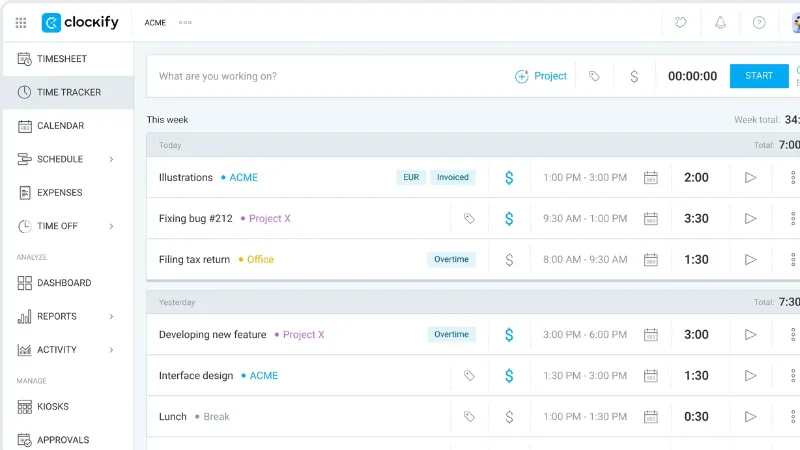
For businesses trying to keep costs under control, Clockify is one of the most compelling options in 2026.
RECOMMENDED FOR YOU
Solana (SOL) Share Price Forecast 2025 – 2030: Future Predictions & Trends
Kailee Rainse
Mar 10, 2025
Its biggest selling point is its free offering. Current comparisons continue to highlight Clockify for its generous free plan, while paid versions add capabilities such as more advanced reporting, approvals and other management features.
Clockify lets teams track time against projects and tasks, create timesheets, monitor billable hours and generate reports. It also offers scheduling and time-off features as part of its broader workforce-management capabilities.
Why choose Clockify?
- It has free option
- Simple timer and timesheets
- Project and task tracking
- Billable-hour tracking
- Reporting and exports
- Useful integrations
- Suitable for growing teams
The downside
The free version is excellent for basic tracking, but businesses wanting sophisticated monitoring, automation, or advanced workforce controls may need to move to a paid plan.
Best for: Freelancers, startups, small businesses and teams looking for affordable time tracking.
3. Hubstaff — Best for remote and field teams
Hubstaff takes time tracking considerably further than a simple timesheet.
It is designed for companies that need greater visibility into remote or mobile work. Depending on the plan and configuration, features can include activity tracking, screenshots, GPS/location tracking, timesheets, scheduling and payroll-related workflows.
That makes it particularly useful when a manager needs to know not just how many hours were logged, but where and how work is taking place.
Current 2026 comparisons identify Hubstaff as a strong choice for remote productivity and monitoring, with GPS and screenshot capabilities among its distinguishing features.
Why choose Hubstaff?
- Employee time tracking
- Activity monitoring
- Screenshots
- GPS tracking
- Remote-team support
- Scheduling
- Payroll and invoicing capabilities
The downside
Screenshots, activity monitoring and location tracking can make employees uncomfortable if they are introduced without clear policies and communication. Privacy is therefore an important consideration when deploying Hubstaff.
Best for: Remote teams, field workers and businesses that genuinely need workforce visibility.
4. Time Doctor — Best for productivity-focused remote teams
Time Doctor is built for companies that want a detailed understanding of how employees spend their working hours.

It can track time, applications and websites, generate productivity reports and provide monitoring features such as screenshots. That makes it particularly popular for remote teams, outsourcing companies and businesses where accountability is an important part of managing distributed workers.
Recent comparisons put Time Doctor among the more monitoring-oriented tools in this category.
Why choose Time Doctor?
- Automatic time tracking
- App and website tracking
- Productivity reports
- Idle-time detection
- Optional screenshots
- Remote workforce management
The downside
This level of monitoring isn’t right for every workplace.
If your employees are professionals who simply need to record billable hours, a lighter tool such as Toggl Track or Harvest may be more appropriate.
Best for: Remote teams, BPOs, outsourcing companies and businesses that need detailed accountability.
5. Harvest — Best for agencies and client billing
For agencies and consultants, tracking time is often only half the job.
The other half is turning those hours into accurate client invoices.

That’s where Harvest stands out. The platform combines time tracking with project budgets, expenses, reporting and invoicing, allowing businesses to connect the hours worked with the money they need to bill.
Currently, 2026 comparisons continue to position Harvest as a strong choice for project-based billing and invoicing.
Why choose Harvest?
- Time tracking
- Project budgets
- Expense tracking
- Client invoicing
- Billable-hour management
- Project reporting
- Accounting integrations
The downside
Harvest isn’t built around employee surveillance. If you need screenshots, GPS or detailed app-usage monitoring, you’ll need another solution.
Best for: Agencies, consultants, freelancers and professional-service businesses that bill clients by time.
6. Everhour — Best for teams already using project-management software
Everhour makes the most sense when your team already lives inside a project-management platform.
Instead of forcing employees to jump between a project-management system and a separate time tracker, Everhour connects time tracking directly to project workflows. It supports integrations with tools such as Asana, ClickUp and Trello.
That means employees can track time against the work they’re already doing rather than maintaining a separate list of tasks.
Why choose Everhour?
- Task-level time tracking
- Project budgets
- Expense management
- Custom reports
- Project-management integrations
- Useful for Agile teams
The downside
Everhour makes less sense if you don’t already rely heavily on project-management software.
Best for: Agencies, software teams and project-driven businesses using tools such as Asana or ClickUp.
7. DeskTime — Best for automatic productivity tracking
DeskTime takes a more automated approach to time tracking.
Rather than asking employees to remember to start and stop timers throughout the day, the platform focuses on automatically capturing activity and turning that information into productivity insights.
It can help managers understand working patterns, productive time, idle time and attendance.
Why choose DeskTime?
- Automatic time tracking
- App and website monitoring
- Productivity analysis
- Attendance tracking
- Shift management
- Reports and dashboards
The downside
Automatic monitoring can feel intrusive if employees aren’t told clearly what is being collected and why.
For companies that simply need billable-hour tracking, DeskTime may provide more monitoring than necessary.
Best for: Remote and hybrid businesses that want automated productivity insights.
8. RescueTime — Best for personal productivity
RescueTime is slightly different from many of the other tools on this list.
Its focus is less on traditional employee attendance and more on helping people understand where their time goes.
The software automatically tracks activity across apps and websites and can show users how much time they spend on focused work versus potentially distracting activities.
That makes it particularly useful for professionals who want to improve their own habits rather than managers looking for a comprehensive workforce-monitoring platform.
Why choose RescueTime?
- Automatic activity tracking
- Focus insights
- Productivity trends
- Distraction analysis
- Personal productivity reports
The downside
It lacks many of the workforce-management features businesses may expect, such as GPS, payroll workflows or robust attendance management.
Best for: Individuals, freelancers and professionals trying to improve focus.
9. TimeCamp — Best for automated time tracking and reporting
TimeCamp is another useful option for companies that don’t want employees manually recording every minute of their day.
Its automatic tracking capabilities can help reconstruct working time and connect that information with projects and reports.
It sits somewhere between a simple time tracker and a more automated productivity platform, making it useful for teams that want more visibility without necessarily moving into full employee surveillance.
Best for: Teams that want automated time tracking, project reporting and productivity insights.
10. QuickBooks Time — Best for businesses using QuickBooks
If your business already runs its finances through QuickBooks, using a time tracker that connects directly to that ecosystem can save a surprising amount of administrative work.
QuickBooks Time is particularly useful for businesses where employee hours feed directly into payroll, client billing or accounting processes.
Rather than exporting timesheets and manually transferring figures between systems, the goal is to keep those workflows connected.
Why choose QuickBooks Time?
- Employee time tracking
- Mobile time tracking
- Scheduling
- GPS functionality
- Payroll integration
- Strong QuickBooks connection
The downside
Its biggest advantage is also its limitation: businesses that don’t use QuickBooks may not get the same value from choosing it.
Best for: Businesses already using QuickBooks for accounting and payroll.
How we compared the best employee time tracking software
Choosing a time tracker shouldn’t be about counting how many features appear on a pricing page.
A better question is: Does the software solve the problem your business actually has?
For this 2026 comparison, the most important factors are:
Ease of use
If employees need extensive training just to record their hours, adoption becomes a problem. A simple tool that everyone uses consistently is often more valuable than a sophisticated platform that nobody likes.
Time-tracking accuracy
The software should make it easy to record working hours, correct mistakes, and understand how time was allocated across projects.
Employee monitoring
Some businesses need screenshots, application tracking or GPS. Others absolutely don’t. Monitoring should match the business need rather than being treated as a default feature.
Reporting
Raw hours are transformed into valuable knowledge through good reporting. Managers shouldn't have to spend hours creating spreadsheets in order to view project costs, billable time, attendance, or productivity.
Integrations
Time data becomes much more valuable when it connects with payroll, accounting, project-management and invoicing systems.
Pricing
A cheap tool isn’t necessarily cheap if you have to add several other services to make it work. Look at the total cost for your actual team size.
Conclusion
The best employee time tracking software isn’t necessarily the one with the longest feature list.
For one company, the ideal solution might be a simple timer that employees barely notice. For another, GPS, scheduling, and payroll integration may be essential. The ability to convert tracked hours into an invoice without having to manually recreate the timesheet can be the most crucial feature for an agency.
That’s why Toggl Track, Clockify, Hubstaff, Time Doctor, Harvest, Everhour, DeskTime, RescueTime, TimeCamp and QuickBooks Time all have a place in the 2026 conversation, but they solve different problems. Recent comparisons likewise show that the category ranges from lightweight billable-hour trackers to full employee-monitoring platforms.
FAQs
What is employee time tracking software?
Is employee time tracking software worth it?
Is employee monitoring the same as time tracking?
Is Clockify really free?
Which time tracker is best for freelancers?
Which software is best for remote employees?
Does time tracking improve productivity?
Recommended Stories for You

Kailee Rainse Jun 6, 2026

Oliver Bennett Jun 18, 2024

Kailee Rainse Feb 5, 2025

Oliver Bennett Jul 8, 2026
Trending Stories

Phoenix Copper Share Price Prediction (2025-2030): Expert Analysis & Predictions
CRH Share Price Prediction 2025, 2026 to 2030 – Expert Analysis

Henry Zeffman’s Wife: Exploring His Life, Career and Personal Journey

MMS69 BATMAN – Hot Toys The Dark Knight Batmobile Tumbler Movie Masterpiece NIB

Top 10 AI Applications
Fix “Your Organization’s Data Cannot Be Pasted Here” Easily
BlackRock World Mining Trust plc Share Price Prediction (2025–2030): Expert Analysis & Predictions

Money6x.com Earnings: What You Need to Know About Earning Your First $100