

 Follow us
 Follow us
Running a small business is not an easy task. You may be chasing an unpaid estimate, updating a spreadsheet, responding to an email, and trying to recall which prospect you said you would call back on Friday.
That is exactly where a good CRM can earn its keep.
A customer relationship management (CRM) system gives you one place to keep customer details, track sales opportunities, record conversations, manage follow-ups, and see what needs attention next. Instead of relying on scattered spreadsheets, inboxes, and someone’s memory, your team can work from the same information.
The best CRM for a small business is rarely the one with the longest feature list. A five-person consultancy does not necessarily need the same software as a rapidly growing sales team. Paying for dozens of advanced features that nobody uses can be just as frustrating as having no CRM at all.
For UK small businesses in 2026, five particularly strong options stand out: Capsule CRM, HubSpot, Pipedrive, Zoho CRM and monday CRM.
The right choice ultimately comes down to how your business actually works.
1. Capsule CRM — Best Overall for Small UK Businesses
If you want a CRM that feels like a useful business tool rather than another project to manage, Capsule CRM is a particularly strong choice.

Capsule is built by Manchester-based Zestia, making it one of the more recognisably UK-rooted options in a market dominated by large international software companies. Its appeal is not that it tries to do absolutely everything. Quite the opposite.
It keeps things relatively focused.
You get a central place for contacts, sales opportunities, tasks, customer history and follow-ups without having to spend weeks configuring the system.
Best for
Sole traders, freelancers, consultants and small UK teams that want a straightforward CRM they can actually use.
What makes Capsule stand out?
The biggest advantage is simplicity.
A small team does not need to hold a training workshop every time someone wants to update a customer record. Capsule’s interface is designed around the everyday things a small business needs to do: manage contacts, move deals through a pipeline, schedule follow-ups, and keep customer information together.
It also connects with familiar business tools, including accounting and productivity applications such as Xero, QuickBooks, Sage, and Google Workspace.
Capsule offers a free plan for up to two users and 250 contacts, while paid plans start at around £14 per user per month in current 2026 comparisons.
That makes it particularly attractive to a micro-business that is finally ready to move beyond spreadsheets but does not want to commit to a complicated enterprise-style CRM.
Pros
- Easy to learn
- UK-based company
- Useful sales pipeline
- Good contact management
- Integrations with popular business tools
- Suitable for freelancers and small teams
Cons
- Not as deep as larger CRM platforms
- Advanced automation requires higher plans
- Marketing functionality is more limited than HubSpot
- Businesses with complex sales operations may eventually need more
2. HubSpot — Best Free CRM for Small Businesses
If Capsule is about keeping things simple, HubSpot takes a different approach.
It gives small businesses a surprisingly capable starting point and then offers a much larger ecosystem as they grow.
That makes HubSpot especially interesting for businesses where sales and marketing are closely connected.
You can start with contact management and deal tracking, then add marketing, customer service, reporting, and automation as your needs become more sophisticated.
Best for
Startups and small businesses that want to begin with a free CRM and potentially build a broader sales and marketing system later.
What makes HubSpot stand out?
The free CRM is the obvious attraction.
For a business that has never used a CRM before, being able to start without immediately paying a monthly subscription lowers the barrier considerably. Current 2026 comparisons continue to identify HubSpot as one of the strongest free options for small businesses.
You can manage contacts, deals, and a sales pipeline, while the wider HubSpot ecosystem gives you room to add more tools later.
This can be particularly useful for a growing company that wants sales and marketing information in the same ecosystem.
But there is something small businesses should watch carefully: costs can rise as you move into more advanced paid features.
The free version can be excellent for getting started. Once you need more sophisticated automation, reporting, or marketing capabilities, the pricing structure becomes considerably more important.
Pros
- Strong free CRM
- Good contact and deal management
- Sales and marketing ecosystem
- Large integration marketplace
- Plenty of room to grow
- Good option for marketing-led businesses
Cons
- Costs can increase quickly as requirements grow
- Advanced features sit behind paid plans
- Can become more complicated than a micro-business needs
- Some businesses may end up paying for features they rarely use
3. Pipedrive — Best CRM for Sales-Focused Small Teams
Some businesses do not need a giant marketing platform.
RECOMMENDED FOR YOU

Clickfor Net Explained: Simplifying Technology for Everyone
Kailee Rainse
Apr 15, 2026

They simply need to know:
- Who is the prospect?
- What stage is the deal at?
- What do we need to do next?
That is where Pipedrive makes a lot of sense.
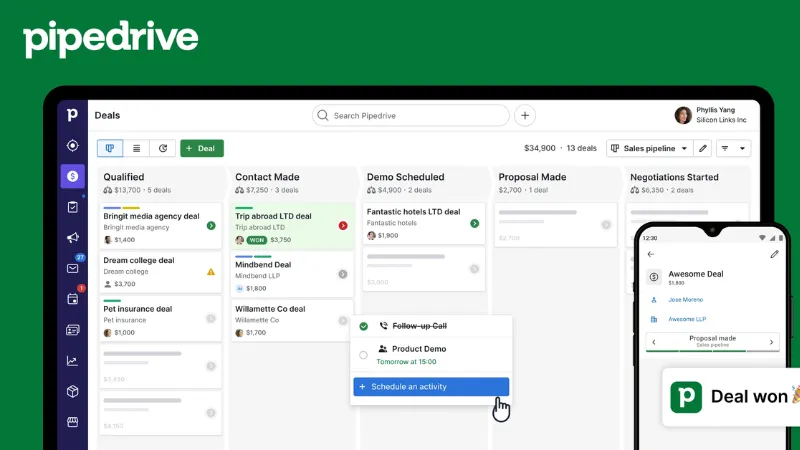
Pipedrive is built around the sales pipeline. Instead of burying your deals inside a complicated interface, it puts the sales process front and centre.
Best for
Small sales teams, consultants, agencies and businesses where winning and managing deals is the main priority.
What makes Pipedrive stand out?
The visual pipeline is the star of the show.
You can see prospects moving from one stage to another, identify deals that have stalled, and understand what your sales team should be working on next.
That sounds simple, but it can make a major difference.
A sales manager does not have to ask five people for an update. They can open the CRM and see what is happening.
Pipedrive is also designed to be relatively quick to adopt, which is one reason it repeatedly appears near the top of 2026 small-business CRM comparisons. Its entry paid plans are around the mid-£teens per user per month, depending on the plan and billing arrangement.
There is no permanent free plan, but a trial gives businesses a chance to test it before committing.
Pros
- Excellent visual sales pipeline
- Easy for sales teams to understand
- Strong activity and deal tracking
- Good mobile experience
- Large integration ecosystem
- Quick to get started
Cons
- No permanent free plan
- Marketing features are not its main strength
- Advanced functionality becomes more expensive
- May be unnecessary for businesses with very simple customer management needs
4. Zoho CRM — Best Value for Small Businesses
If your reaction to CRM pricing is, “There must be a way to get more for less,” take a serious look at Zoho CRM.
Zoho has built a reputation for packing a lot of functionality into relatively affordable plans.
That makes it particularly appealing to small businesses that have outgrown a basic contact database but are not ready to spend heavily on software.
Best for
Budget-conscious small businesses that want advanced CRM capabilities without moving straight into expensive software.
What makes Zoho stand out?
Zoho offers a broad collection of CRM features, including contact management, lead management, workflow automation, analytics, and AI-assisted functionality.
It also sits within the wider Zoho ecosystem, which includes dozens of business applications.
That can be useful if you eventually want to connect your CRM with other parts of your business rather than stitching together unrelated software.
Current 2026 sources put Zoho’s entry paid plans at roughly £12–£14 per user per month, with a free option available for up to three users depending on the current plan structure.
Pros
- Strong feature set for the price
- Free option for small teams
- Automation capabilities
- AI features
- Large business software ecosystem
- Good choice for businesses that want room to customise
Cons
- Interface can feel busier than Capsule or Pipedrive
- More configuration may be required
- Learning curve is higher
- Some small teams may never use its deeper features
5. Monday CRM — Best for Visual Workflows
If your team already uses monday.com, moving to monday CRM can feel quite natural.
Rather than treating CRM as a completely separate system, monday combines customer and sales management with its broader visual work-management environment.
Best for
Small teams that like visual boards and want sales, customer work and projects to sit in the same workspace.
What makes Monday CRM stand out?
Instead of forcing every company to follow exactly the same CRM workflow, monday allows teams to customise boards, stages, workflows and automations.
That can be useful for businesses that have unusual processes.
For example, a small agency could use the platform to track a prospect from first contact through proposal, sale, onboarding, and project delivery without moving between several completely separate systems.
Pros
- Highly visual
- Flexible workflows
- Useful automation
- Combines CRM and work management
- Good for teams already using monday.com
- Easy to customise
Cons
- Seat minimums can affect the real price
- May feel like more software than a tiny business needs
- Less sales-focused than Pipedrive
- Costs can rise with additional requirements
Top 5 CRM Systems for UK Small Businesses: Which One Should You Choose?
There is no need to pick the CRM with the longest feature list.
Instead, start with the problem you are trying to solve.
| If you want | Choose |
| The simplest UK-friendly CRM | Capsule CRM |
| A strong free CRM | HubSpot |
| A sales-first CRM | Pipedrive |
| Maximum value and features | Zoho CRM |
| A visual CRM/work-management system | monday CRM |
This is also why different 2026 comparison sites produce different winners. Some prioritise price, others sales functionality, ease of setup, marketing tools or scalability.
The “best CRM” is really the one that solves your particular problem without creating a new one.
What Should a UK Small Business Look for in a CRM?
Before signing up, take a few minutes to think about what you actually need.
1. Ease of use
This should be near the top of the list.
If your team does not like using the CRM, they will quietly return to spreadsheets, email, and WhatsApp.
A simple CRM that everyone uses is more valuable than an advanced system that only one person understands.
2. Price at your actual team size
- Your number of users
- The plan you realistically need
- Annual versus monthly billing
- VAT
- Add-ons
- Automation
- Marketing tools
- Additional storage
- Premium features
A £10 plan can become considerably more expensive once you add everything your business needs.
3. Integrations
Your CRM should work with the software you already use.
For many UK small businesses, that could include:
- Xero
- Sage
- QuickBooks
- Google Workspace
- Microsoft 365
- Mailchimp
- Outlook
- Gmail
The fewer times you have to copy information from one system into another, the better.
4. Data protection
Customer information is not just another spreadsheet.
UK businesses handling personal data need to consider their responsibilities under the UK GDPR and Data Protection Act 2018.
When comparing CRM providers, look at their data-processing terms, security controls, access permissions, retention options, and where data is stored.
Do not assume that “GDPR compliant” is enough to answer every question about how your business should configure the system.
5. Room to grow
You do not want to move your entire customer database again next year.
At the same time, there is no reason to buy an enterprise CRM today just because your company might become much larger in five years.
Buy for the business you have, while making sure the CRM can handle the next stage.
Common CRM Mistakes Small Businesses Make
Choosing the wrong software is only one problem.
The way you introduce it can matter just as much.
Buying too much CRM
A five-person business rarely needs an enterprise platform on day one.
Trying to customise everything
If your CRM takes weeks to configure before anyone can use it, you have probably made things too complicated.
Importing messy data
Moving a messy spreadsheet into a CRM does not magically make the data clean.
Clean duplicate contacts and outdated information before importing them.
Not deciding who owns the CRM
Someone needs to be responsible for keeping the system organised.
Tracking everything
More data is not automatically better.
Track the information your team actually needs to sell, support and retain customers.
Ignoring adoption
This is perhaps the biggest mistake.
A CRM succeeds when people use it consistently.
How to Choose the Right CRM in One Afternoon
If you are overwhelmed by the number of choices, make the decision smaller.
Shortlist two or three platforms.
Then take a small sample of your real customer data and test each one.
Try to answer:
- Can I add a customer quickly?
- Can I find their history?
- Can I create a sales opportunity?
- Can I set a follow-up?
- Can my team understand it without extensive training?
- Does it connect with the software we already use?
- Can we afford the plan we will realistically need?
- Can we export our data if we ever leave?
If one CRM feels noticeably easier after using real information, that is a strong signal.
Conclusion
For most UK small businesses in 2026, there is no reason to choose a CRM simply because it has the biggest feature list.
Capsule CRM is the strongest choice for businesses that want something simple, focused and UK-friendly.
HubSpot is hard to overlook if you want a powerful free starting point and the option to expand into sales and marketing.
Pipedrive is the natural choice for sales teams that want a clean, visual pipeline.
Zoho CRM stands out when getting plenty of functionality for your money matters most.
And today CRM is a smart option for teams that want CRM, workflows, and project-style work management in one visual environment.
FAQs
Which CRM is best for a UK startup?
Is Capsule CRM good for small businesses?
Is HubSpot CRM really free?
Is Pipedrive worth it for a small business?
Is Zoho CRM good for small businesses?
Is monday CRM suitable for small businesses?
What is the cheapest CRM for a small UK business?
Do small businesses really need a CRM?
How many people should use a small-business CRM?
What should I look for in a UK CRM?
Can a CRM replace spreadsheets?
Which CRM is easiest to use?
Recommended Stories for You

Team SR Jun 11, 2025

Kailee Rainse Jun 4, 2025



Kailee Rainse Sep 5, 2025
Trending Stories

ImmuPharma Share Price Prediction (2025–2030): Expert Analysis & Predictions

Tax Code 1257L Explained: Meaning, Tax-Free Allowance, W1, M1 & X

EnergyPathways Share Price Prediction (2025-2030): Expert Analysis & Predictions

Ilika Plc Share Price Prediction (2025–2030): Expert Analysis & Predictions

Invinity Energy Share Price Prediction (2025–2030): Expert Analysis & Predictions
DualMedia News Innovation: What the Experts Aren’t Sharing

Anglo Asian Share Price Prediction (2025–2030): Expert Analysis & Predictions

Nanoco Share Price Prediction (2025–2030): Expert Analysis & Forecasts